
In-app Instant Access: How to Disable this feature
In-app Instant Access: How to Disable this feature.
Introduction
A community-wide setting exists that allows all user settings to be preserved while turning that functionality off. The setting is This setting was created to allow Community Administrators full freedom and convenience in deciding how and when this feature is available to their communities.
What does ‘DISABLE In-App Instant Access for every user at the community’ do?
This feature flag is located on the ‘Credentialed Access - Settings’ page and turns In-app Instant Access OFF for every user at the community.
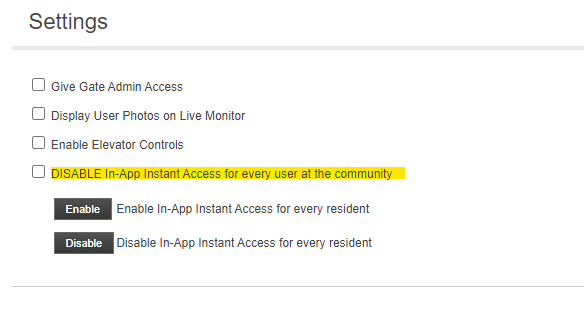
It is meant to be a “Killswitch” for the feature if that is needed. The setting is ‘off’ by default (shows unchecked) and can be turned on at any time using these steps:
- Sign in as a Community Administrator or Dealer.
- Click ‘Credentialed Access’.
- Click ‘Settings’.
- Check the box labeled ‘DISABLE In-App Instant Access for every user at the community’.
- Click ‘Save’.
- See the warning and click ‘OK’ to proceed.
NOTE: The same setting can be unchecked at any time to return In-App Instant Access functionality to the users setup for that feature. Any valid user that previously had access will have access again, and any users that did NOT have access will continue to not have that feature available (all settings are retained when ‘DISABLE In-App Instant Access for every user at the community’ is used).