
Resident - Registering Your FRONTSTEPS Dwelling Account
FRONTSTEPS
Built for Connected Communities
Registering Your FRONTSTEPS
Dwelling Account
Resident Guide
How to register your account for the first time using a registration code or
a temporary email and password.
AU D I E N C E
Residents
TO P I C S
Account Registration,
Registration Codes,
Login Credentials
D O C U M E N T T Y P E
Support Guide
FRONTSTEPS | frontsteps.com | Support Guide
★ Table of Contents
1 About This Guide
What you need before you register
2 Getting Started
Four steps from the website to the registration form
3 Registering With a One-Time Use Registration Code
The fields to complete when your letter has a code
4 Registering With a Temporary Email and Password
The fields to complete when your letter has temporary credentials
5 Quick Reference Checklist
The full process on one list
FRONTSTEPS Registering Your Dwelling Account
frontsteps.com | Built for Connected Communities Page 1
1 About This Guide
To register your account for the first time, you need a welcome letter in the mail or a welcome email
from your community. The letter or email includes either a one-time use registration code or a
temporary email and password, which you will use to get started. Check your letter to see which
option applies to you.
i Havenʼt Received a Welcome Letter?
If you have not received one yet, contact your community administrator and request a welcome
letter.
Before You Start
Your New Login
The email and password you enter here become the credentials you use to access FRONTSTEPS
Dwelling in the future. They work for both the Dwelling Community website and the Dwelling
Mobile app.
You have your welcome letter or welcome email from your community[ ]
You are using an internet browser Chrome, Firefox, or Safari preferred)[ ]
You have chosen the email address and password you will use going forward[ ]
Your new password is at least 12 characters long with at least one capital letter, one number, and
one special character
[ ]
FRONTSTEPS Registering Your Dwelling Account
frontsteps.com | Built for Connected Communities Page 2
2 Getting Started
1 Open the website
Open an internet browser Chrome, Firefox, or Safari preferred) and go to
community.dwellinglive.com.
2 Select Register Now
On the Welcome Home page, select Register Now next to New to FRONTSTEPS Dwelling?
Welcome Home page with Register Now highlighted
3 Choose your registration option
On the Register Now page, select the option that applies to the letter you received: I have a one-
time use Registration Code or I have a Temporary Email & Password. Then select Next.
Register Now page with the two registration options highlighted
4 Complete the form
Fill out the prompts for the option you chose, then select Submit. The sections below list the
fields for each option.
FRONTSTEPS Registering Your Dwelling Account
frontsteps.com | Built for Connected Communities Page 3
3 Registering With a One-Time Use Registration Code
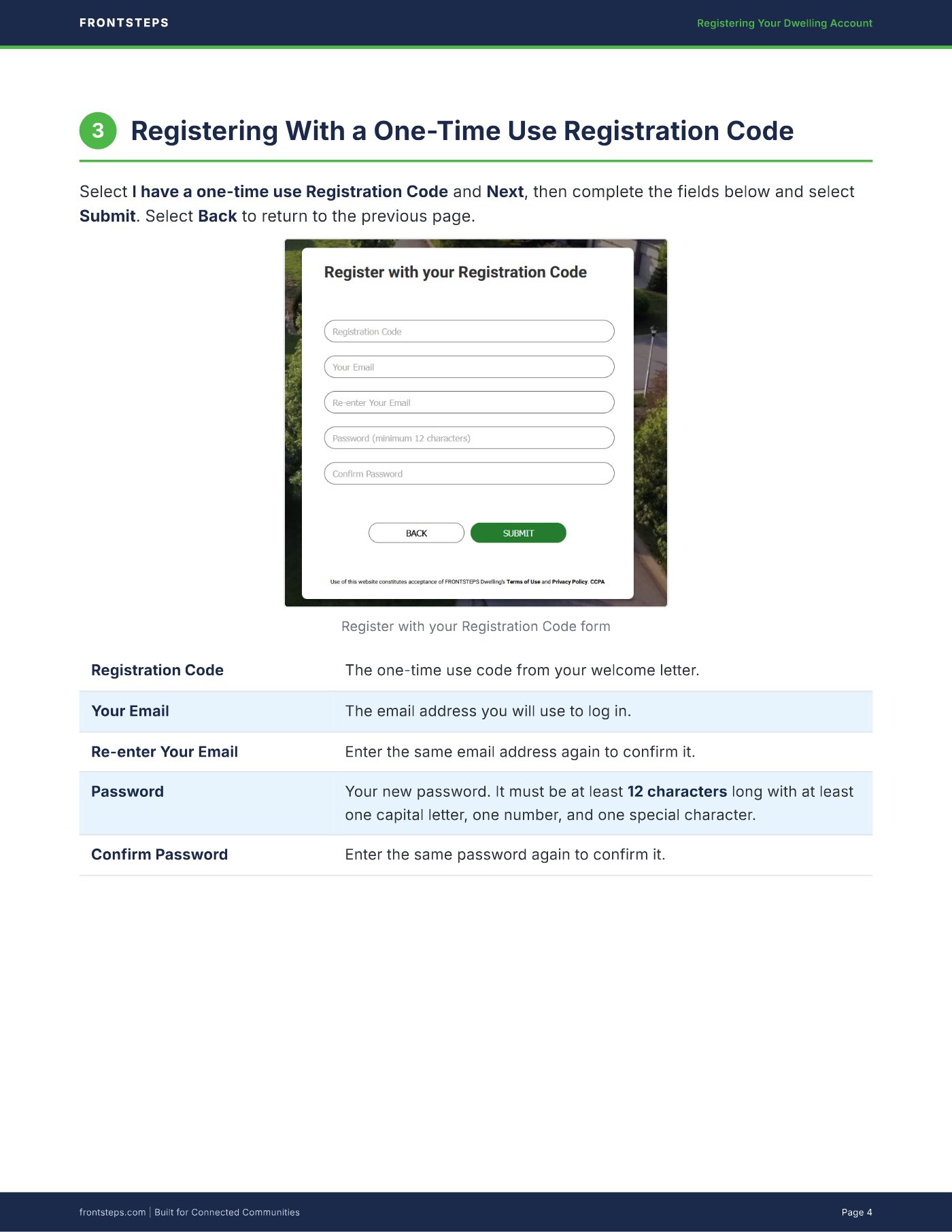
Select I have a one-time use Registration Code and Next, then complete the fields below and select
Submit. Select Back to return to the previous page.
Register with your Registration Code form
Registration Code The one-time use code from your welcome letter.
Your Email The email address you will use to log in.
Re-enter Your Email Enter the same email address again to confirm it.
Password Your new password. It must be at least 12 characters long with at least
one capital letter, one number, and one special character.
Confirm Password Enter the same password again to confirm it.
FRONTSTEPS Registering Your Dwelling Account
frontsteps.com | Built for Connected Communities Page 4
4 Registering With a Temporary Email and Password
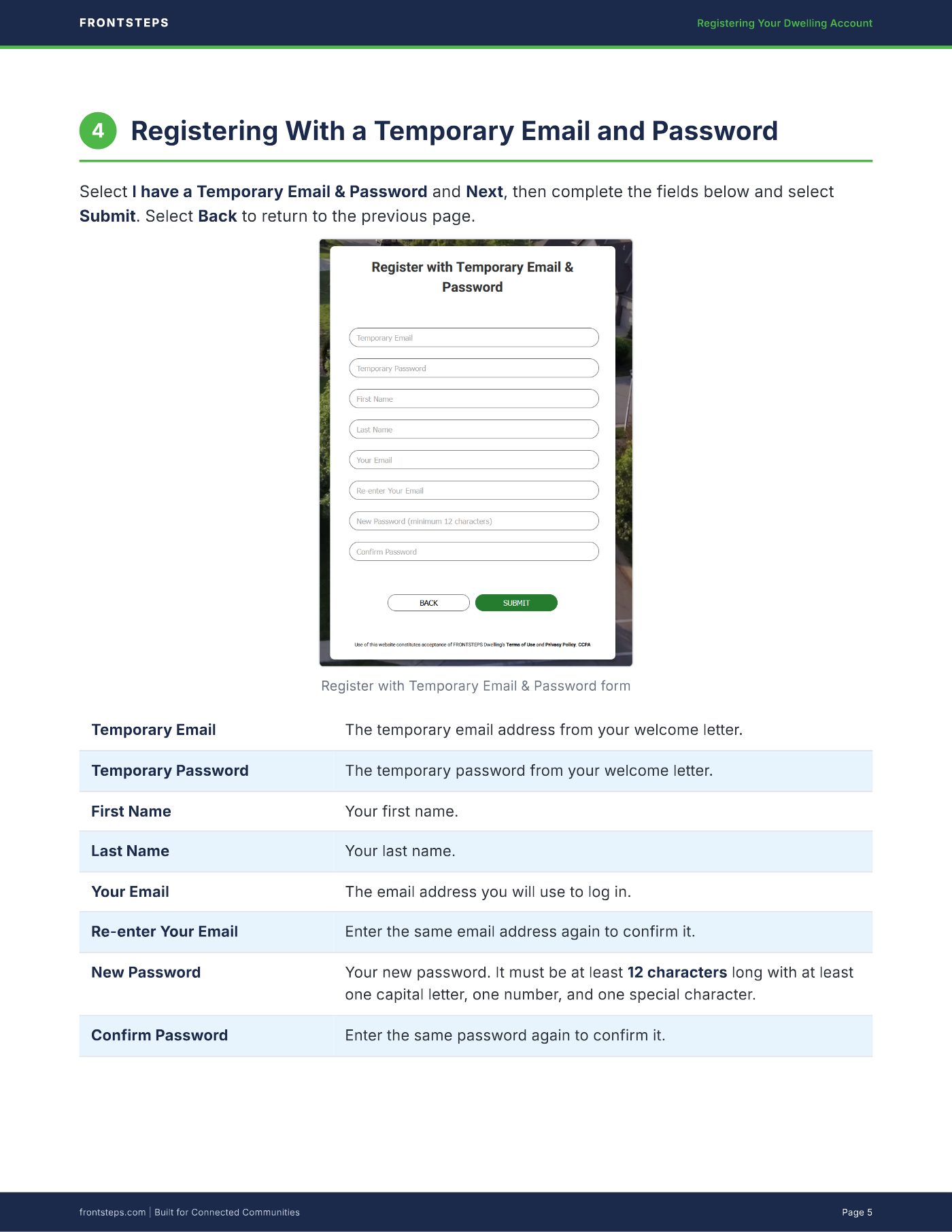
Select I have a Temporary Email & Password and Next, then complete the fields below and select
Submit. Select Back to return to the previous page.
Register with Temporary Email & Password form
Temporary Email The temporary email address from your welcome letter.
Temporary Password The temporary password from your welcome letter.
First Name Your first name.
Last Name Your last name.
Your Email The email address you will use to log in.
Re-enter Your Email Enter the same email address again to confirm it.
New Password Your new password. It must be at least 12 characters long with at least
one capital letter, one number, and one special character.
Confirm Password Enter the same password again to confirm it.
FRONTSTEPS Registering Your Dwelling Account
frontsteps.com | Built for Connected Communities Page 5
5 Quick Reference Checklist
This guide is intended for residents registering a FRONTSTEPS Dwelling account for the first time.
For additional assistance, contact your community administrator, FRONTSTEPS Support, or visit
frontsteps.com.
Have your welcome letter or email ready[ ]
Go to community.dwellinglive.com[ ]
On the Welcome Home page, select Register Now[ ]
Select I have a one-time use Registration Code or I have a Temporary Email & Password, then
select Next
[ ]
Fill out every field (new password: 12 characters, with a capital letter, number, and special
character)
[ ]
Select Submit[ ]
Use the same email and password on the Dwelling Community website and the Dwelling Mobile
app
[ ]
FRONTSTEPS Registering Your Dwelling Account
frontsteps.com | Built for Connected Communities Page 6