
ALLi - Violation Creation and Management
ALLi - Violation Creation and Management
ALLi helps you create, update, and manage violations using simple instructions, while keeping everything structured and aligned with your community’s enforcement rules.
Instead of navigating multiple screens, you can describe the violation in plain language and ALLi will translate it into a properly structured record.
Quick Takeaway: Tell ALLi what happened, where it happened, and what rule applies. ALLi handles the structure, validation, and creation of the violation.
What ALLi Can Do
ALLi supports the full lifecycle of violation management.
- Create new violations using natural language
- Update existing violations with notes or changes
- Attach photos or supporting documents
- Assign or update inspectors
- Set or adjust compliance deadlines
- Track violation status and history
- Summarize open or overdue violations
Built for real workflows: ALLi does not just log violations—it helps keep enforcement organized, consistent, and tied to your community rules.
Information Needed to Create a Violation
To create a violation, ALLi must identify the property, the rule being violated, and the inspector responsible.
Core information includes:
- Property or Unit: Address, unit number, or homeowner name
- Community: The correct association or property group
- Violation Category: Example: Landscaping, Parking, Trash Cans
- Violation Rule: Example: Grass too long, Unauthorized parking, Trash cans left out
- Inspector: Staff member responsible
- Observation Date: When the violation was identified
Optional but recommended:
- Custom description
- Compliance or follow-up date
- Photos or attachments
How ALLi Creates a Violation
ALLi follows a structured process behind the scenes to ensure the violation is created correctly.
Step 1: Locate the property using address, unit, or homeowner
Step 2: Identify the correct community configuration
Step 3: Retrieve available violation categories and rules
Step 4: Confirm the assigned inspector
Step 5: Create the violation tied to the correct rule and property
This ensures all violations align with the community’s configured enforcement rules and reporting structure.
Example Instructions
You can create violations using simple, natural language. ALLi will translate your request into the correct structure.
Create a violation for 28025 Riverbridge Dr. Category: Trash Cans. Issue: Trash cans left out past garbage day. Inspector: Mary Guck. Add a follow-up in 10 days.
Log a violation for [address]. Category: Parking. Issue: Unauthorized vehicle parked overnight. Assign to [Inspector Name].
What Happens After Creation
Once a violation is created, it becomes part of your community’s enforcement record and appears in the violation detail view.
The violation record includes structured information and supports ongoing actions such as notices, fines, and status updates.
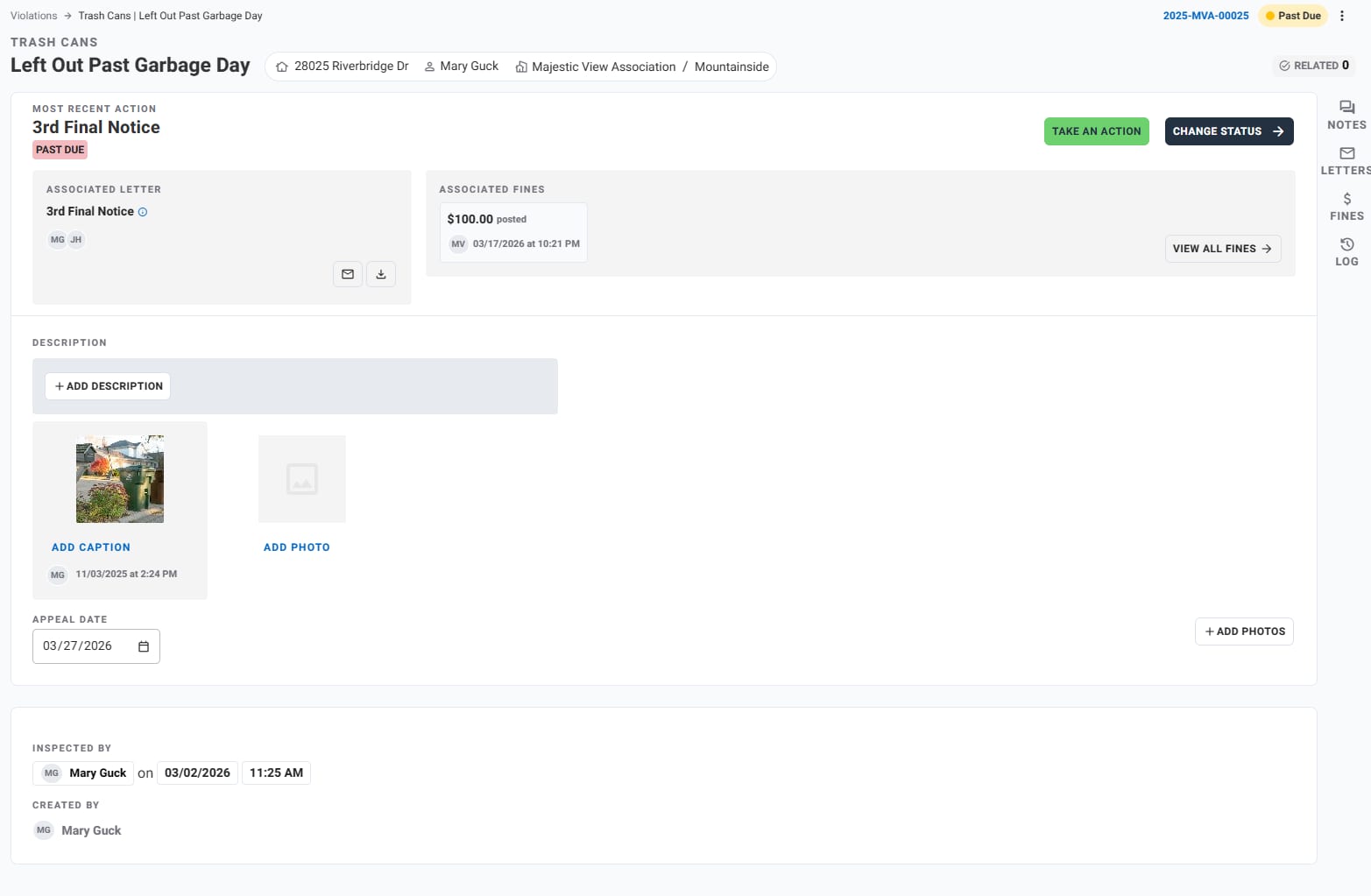
Example Violation Record
Violation: Trash Cans – Left Out Past Garbage Day
Property: 28025 Riverbridge Dr
Homeowner: Mary Guck
Community: Majestic View Association – Mountainside
Status: Open / Past Due
Most Recent Action: 3rd Final Notice
Associated Fine: $100.00
Inspector: Mary Guck
Date Observed: March 2, 2026
Appeal Date: March 27, 2026
Violation Data Created
ALLi creates a structured violation record that aligns with your community’s enforcement configuration.
- Violation type and rule
- Property address and homeowner
- Community and group/phase
- Status (Open, Past Due, Resolved)
- Inspector and observation date
- Violation description
- Follow-up or compliance date
- Associated notices or letters
- Fines (if applicable)
- Photos and attachments
- Appeal tracking (if applicable)
Managing Violations After Creation
After a violation is created, ALLi can continue to assist with enforcement and follow-up actions.
- Add descriptions, notes, or updates
- Attach photos and documentation
- Trigger or review notices
- Apply or review fines
- Change status (Open, Past Due, Resolved)
- Adjust compliance or appeal dates
- Review activity history
Using Violations in Workflows
Violations can also be managed as part of larger workflows using Steps.
For example, you can:
- Create a Step to review open violations
- Assign the Step to ALLi
- Have ALLi summarize or organize follow-ups
Learn more about ALLi Workflows in Steps
Tips for Better Results
- Be clear about the property and issue
- Include the category when possible
- Add follow-up timing
- Use natural language—ALLi will structure it
- Include photos when needed
Best approach: Start simple. Provide the location and issue first, then refine if needed.
What This Feature Does Not Do
- It does not create violations without enough identifying information
- It does not override community rule configurations
- It does not replace review or approval workflows
- It does not assume missing rule details without confirmation
How This Fits Into Your Workflow
ALLi simplifies violation management by turning instructions into structured actions.
- Create violations faster
- Reduce manual data entry
- Keep enforcement consistent
- Connect violations to workflows
Best fit: Daily inspections, compliance tracking, and communities that want a more streamlined enforcement process.
What’s Next
ALLi can also assist with other operational workflows.
[Insert Link: Maintenance Requests with ALLi]
[Insert Link: Architectural Requests (ARB) with ALLi]