
ALLi - How to Use Prompts in ALLi: Curated Prompts, Saved Prompts, and Best Practices
How to Use Prompts in ALLi
ALLi is designed to work like a conversation, not a search bar. The more clearly you describe what you need, the better and more useful your results will be.
This guide walks through how to talk to ALLi effectively, how to build stronger prompts, and how to use both curated and saved prompts to make your workflows faster and more consistent.
Quick Takeaway: The best prompts usually include the task, the community or topic, a timeframe, and the format you want back.
How to Talk to ALLi
The best way to use ALLi is to treat it like a knowledgeable assistant. Instead of typing short keywords, give it context and direction.
A strong request usually includes:
- What you are looking for
- Where or who it applies to
- A timeframe
- How you want the results structured
Instead of typing:
violations report
Try:
Show me all open violations in [community name] from the last 30 days and group them by status.
You can also continue the conversation to refine the result instead of starting over.
Example follow-up prompts:
- Break these down by violation type.
- Highlight the highest priority items.
- Draft a summary I can send to the board.
This is where ALLi becomes most useful. You are not limited to one prompt. You can guide the conversation step by step.
Build Better Prompts in ALLi
If you want more consistent results, keep your prompts simple but specific.
A strong prompt usually includes:
- The task
- The community, address, unit, portfolio, or topic
- A timeframe when relevant
- The output format you want
Example:
Create a board-ready summary of financial performance for [community] for the last quarter. Include key variances, notable expenses, and a short narrative summary.
You can also attach documents, exports, screenshots, bids, or reports to give ALLi more context and improve accuracy. ALLi supports document-based prompting and broader multimodal inputs, which helps users bring richer context into a request.
Helpful prompt tips:
- Add scope, such as a community name, unit, property, or portfolio.
- Include a timeframe, such as last 30 days, this month, or this quarter.
- Ask for a format, such as a summary, table, board-ready narrative, or CSV.
- Refine with follow-up questions instead of starting over.
Where to Find Prompts in ALLi
Prompts have a dedicated place in ALLi through the left-hand sidebar, making them easier to find, reuse, and build into repeatable workflows. The sidebar was introduced to organize core areas like Documents, Prompts, and Agents into a more discoverable structure.
Tip: Prompts are no longer just examples. They are part of how ALLi is organized and reused in daily work.
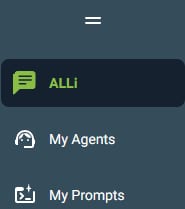
Using Curated Prompts in My Prompts
ALLi includes 26 curated prompts designed to help users start more detailed workflows quickly. These prompts are built as strong starting points for common tasks like reporting, architectural review, bid analysis, communications, and operational summaries.
To use one of these prompts, click the green Use Prompt button. The prompt will paste directly into the ALLi conversation window so you can review it, update any needed details, and begin the conversation.
Important: Some curated prompts include words in brackets, such as [community], [address], or [time period]. Replace those with your own details before sending the prompt so ALLi has the context it needs to return the best result.
What the Brackets Mean
Bracketed text acts as a placeholder. It shows you where to add your own information before sending the prompt.
Common examples include:
- [community]
- [address or unit]
- [timeframe]
- [topic]
Example:
Build a board financial report for [community] for [time period].
Updated version:
Build a board financial report for Oak Ridge HOA for March 2026.
Example Curated Prompts
Here are a few examples of the kinds of workflows the curated prompt library supports. These examples align closely with the existing prompt library structure and copy-ready use cases already documented for ALLi.
3 Most Important Manager Actions
Give me a list of the top 3 most urgent actions for my communities and a brief explanation of why, with links to the related items.
Architectural Request Summary
Pull architectural requests from the last 90 days. Show a status summary, then list the 10 oldest active requests with ARC ID, community, unit or owner, request type, current stage or status, age, and last note or action if available. Identify bottlenecks by stage and recommend next steps.
Bid Review - Multiple Bids
Compare these bids side by side. Create a scope and assumptions matrix, identify missing items and non-comparable terms, and recommend what to clarify. Then provide a short board-ready recommendation with pros and cons of each.
ALLi Capability Snapshot
Based on my role and the data I can access, create a right now action menu. Group into time savers, risk reducers, workload organizers, and blind spots. Under each, give 3 to 5 example requests I can copy and paste.
Curated prompts are meant to be starting points. Once the conversation begins, you can continue refining the request with follow-up prompts.
Save a Prompt for Future Use
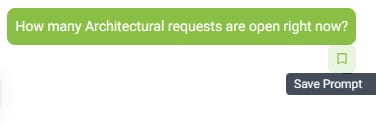
When you refine a prompt in conversation and get it working the way you want, you can save it for later. ALLi supports saving prompts directly from an active conversation so users can reuse strong prompts in future sessions without rebuilding them from scratch.
Use Save Prompt from the conversation to store prompts you have already tested, improved, or want to reuse again in the future.
Saved prompts are useful when you want to:
- Reuse a reporting workflow without rewriting the prompt
- Standardize communications or summaries
- Keep a reliable version of a prompt you have already refined
- Build more consistency across recurring tasks
Why this matters: Saved prompts help turn successful one-time conversations into repeatable workflows.
Curated Prompts vs. Saved Prompts
ALLi supports both curated prompts and saved prompts, and each serves a different purpose.
| Curated Prompts | Saved Prompts |
|---|---|
| Provided in ALLi as ready-to-use starting points | Created by you from real conversations |
| Designed for common workflows and common use cases | Based on prompts you have already refined and tested |
| Best when you want a fast starting point | Best for repeatable, customized workflows |
Most users start with curated prompts, then save their own versions over time.
Use Prompts as Part of a Workflow
Prompts are not just for one-time questions. They are a practical way to make recurring work faster, more structured, and more consistent.
Examples of repeatable workflows:
- Weekly operational summaries
- Board-ready financial reporting
- Architectural or violation reviews
- Bid comparisons and scope reviews
- Homeowner communications
- Document summaries and visual reporting
The existing prompt library also supports document summaries, graph generation, budget analysis, homeowner communications, and common operational reviews.
Voice and Natural Conversation
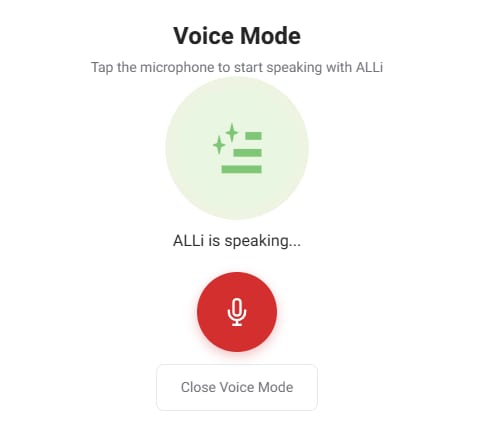
ALLi also supports voice input, making it easier to interact naturally when typing is not convenient. This was introduced to support hands-free, more natural interaction, especially for managers in the field or users multitasking during the day.
You can speak naturally, then continue refining the conversation with follow-up prompts just as you would when typing.
Best Practices for Better Results
- Be specific instead of general
- Include community, address, unit, owner, or timeframe when relevant
- Ask for the format you want
- Replace bracketed text before sending a curated prompt
- Use follow-up questions to refine results
- Attach supporting files or documents when more context is needed
Always review before acting: ALLi can help speed up research, summaries, drafting, and analysis, but results should always be reviewed before acting on them, especially for financial, compliance, or homeowner-facing decisions. This guidance is consistent with your current prompt library messaging.
Examples You Can Try
Daily Operations
- Show me a summary of open maintenance requests for [community].
- Get a summary of violations by status for [community].
- List all current architectural requests for [address or unit].
Board and Financials
- Build a board-ready financial report for [community] for [time period].
- Prepare a budget analysis for [community] using historical financials and highlight major variances.
Projects and Vendors
- Compare vendor bids for [project] and provide a pros and cons summary with a recommendation.
- Draft a Scope of Work for [project or repair] including assumptions, exclusions, timeline, and acceptance criteria.
Communications
- Draft a broadcast message to homeowners about [topic] in a friendly but firm HOA tone.
- Summarize recent emails about [topic] and draft a clear reply I can send.
Documents and Analysis
- Summarize or extract details from a document I upload.
- Visualize report data as graphs or executive summaries.
What’s Next
This article focuses on how to use prompts effectively in ALLi. As you become more comfortable, curated prompts and saved prompts can help you build faster, more repeatable workflows that match how your team actually works.
You can start with a curated prompt, refine it through conversation, and save the version that works best for you.