
ALLi - Memory and Context
ALLi - Memory and Context
Memory allows ALLi to store and recall important information across conversations so it can provide more helpful, context-aware assistance over time.
Instead of repeating the same details in every interaction, you can allow ALLi to remember certain information for future use. This helps streamline workflows and improves continuity across conversations.
Quick Takeaway: ALLi can remember useful details for future conversations, but only after you confirm that the information should be saved. Memory is tied to your user context and is not automatically shared with other users.
What Memory Does
Memory helps ALLi retain useful information between conversations so it can provide more relevant responses later.
This means ALLi can reference saved details when they are helpful instead of asking you to repeat the same information over and over.
- Community details
- Vendor contacts
- Board member information
- Preferred workflows or processes
- Important decisions
- Key dates or deadlines
- Financial or operational values
Built for continuity: Memory helps ALLi support ongoing work more effectively by carrying forward useful context into future conversations.
How Memory Works
Memory follows a simple confirmation-based process.
Step 1: Useful information comes up during a conversation
Step 2: ALLi asks whether you want that information saved
Step 3: You confirm that it should be remembered
Step 4: ALLi stores the information for future conversations
This confirmation step is important because ALLi does not automatically save every detail. It asks first before storing memory.
Example Memory Scenario
Here is a simple example of how memory works in practice.
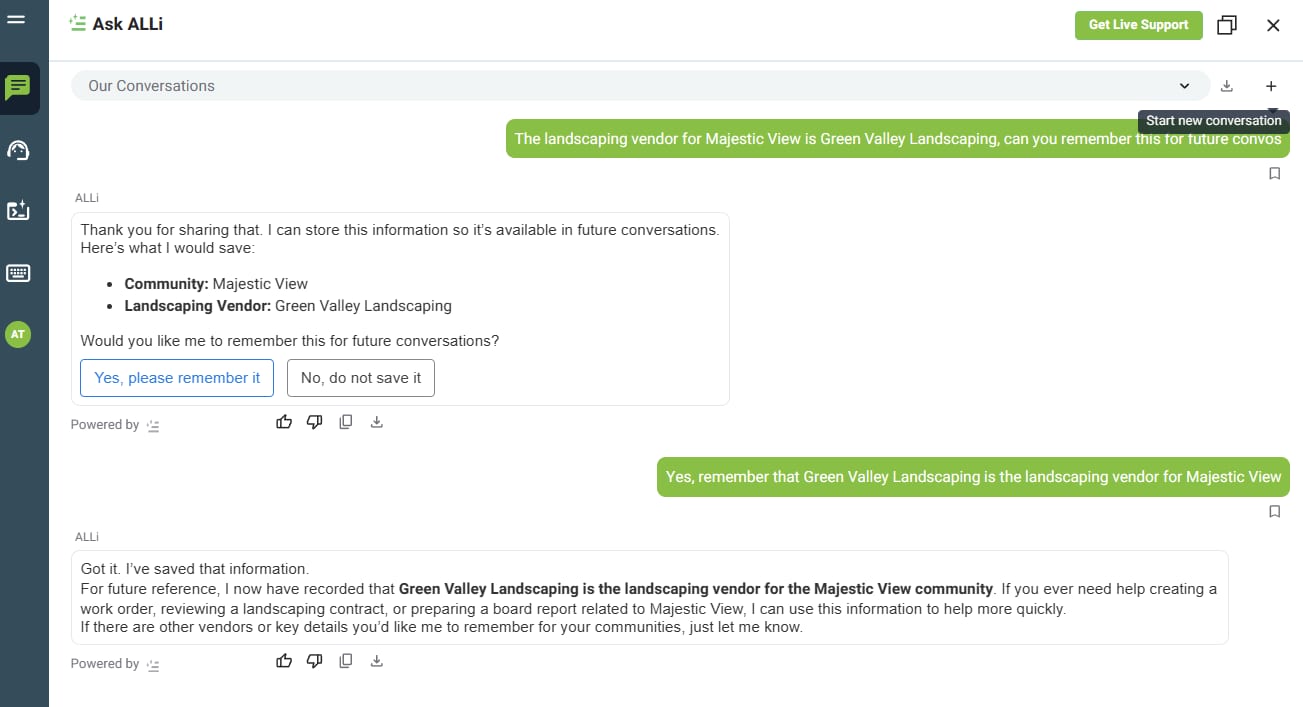
This behavior is shown directly in the uploaded memory example.
What Memory Is Tied To
Memory is tied to your user context, not shared automatically across all users in the same instance.
That means:
- Saved memory is available in your future conversations
- It is not automatically shared with other users in your organization
- It helps ALLi provide continuity when you return to the same communities, vendors, or projects later
Important: Memory is personal to your interaction context. Other users do not automatically inherit or use your saved memory.
Does Memory Persist Across Conversations?
Yes. Once saved, memory is designed to persist beyond the current conversation and can be used in future chats with you.
For example, after saving vendor information, you can start a completely new conversation later and ask a follow-up question like:
- Who handles landscaping for Majestic View?
- Which vendor handles landscaping at Majestic View?
ALLi can then recall that saved information in the new conversation. The uploaded example confirms that memory persists across new conversations and is not limited to a single thread.
Managing Memory
You remain in control of what ALLi remembers.
- View stored memory information
- Update saved details
- Delete information that is no longer needed
- Limit what ALLi remembers
If something changes, you can simply tell ALLi to update or remove it. The uploaded example also shows that ALLi can adjust memory later if needed.
Examples of Helpful Memory
Memory is most useful when the same information comes up repeatedly over time.
Examples include:
- Remembering which vendor serves a specific community
- Keeping track of a preferred board report style
- Remembering recurring deadlines or operational priorities
- Keeping continuity around a project or ongoing issue
How it helps: Memory reduces repetitive setup and gives ALLi more context to work with, which can make recurring tasks faster and easier.
Key Benefits
- Less repetitive input
- More personalized assistance
- Better continuity between conversations
- Faster responses for recurring tasks
In practice, memory helps ALLi feel more consistent and useful over time without requiring you to restate the same information in every conversation.
What Memory Does Not Do
- It does not automatically save every detail from every conversation
- It does not store information without asking for confirmation first
- It is not automatically shared across all users
- It does not prevent you from updating or deleting saved details later
How This Fits Into Your Workflow
Memory makes ALLi more useful for ongoing work by carrying forward the details that matter most to you.
- Reduce repeated setup in recurring workflows
- Keep continuity across community-specific conversations
- Support more personalized responses over time
- Improve efficiency in repeat tasks and follow-ups
Best fit: Repeating workflows, community-specific follow-ups, vendor tracking, and situations where continuity across conversations saves time.
What’s Next
ALLi’s memory works especially well alongside prompts, workflows, and recurring operational tasks.
[Insert Link: ALLi - Workflows in Steps]
[Insert Link: ALLi - How to Use Prompts in ALLi]