
ALLi - Maintenance Request Creation and Management
ALLi - Maintenance Requests Creation and Management
ALLi helps you create, track, and manage maintenance requests using simple instructions while keeping everything organized within your community’s maintenance workflow.
Requests can be created for both individual units and common areas, and are automatically categorized, assigned, and tracked through inspection, vendor coordination, and completion.
Quick Takeaway: Tell ALLi what the issue is and where it’s happening. ALLi will create and organize the maintenance request, assign it, and track it through completion.
What ALLi Can Do
ALLi supports the full lifecycle of maintenance management.
- Create maintenance requests using natural language
- Support both unit-level and common area requests
- Assign inspectors and vendors
- Attach photos and documentation
- Track deadlines and status
- Update and manage requests over time
- Summarize open or overdue maintenance items
Built for real operations: ALLi connects maintenance issues to locations, vendors, and timelines—keeping everything structured and easy to manage.
Information Needed to Create a Maintenance Request
To create a maintenance request, ALLi must identify where the issue is happening and what needs to be addressed.
Location (Required):
- Unit: Address or homeowner (example: 28025 Riverbridge Dr)
- Common Area: Location description (example: Pool, Clubhouse, Parking Lot)
- Community: Association and group if applicable
Request Details:
- Maintenance category (example: Landscaping, Electrical, Plumbing)
- Description of the issue
- Date observed (if known)
Assignment (Optional but Recommended):
- Inspector or staff member
- Vendor assignment
- Deadline or due date
Additional Details:
- Photos of the issue
- Notes or context
How ALLi Creates a Maintenance Request
ALLi follows a structured process to ensure the request is properly configured.
Step 1: Identify the unit or common area location
Step 2: Match the issue to the correct maintenance category
Step 3: Capture description and details
Step 4: Assign inspector or vendor (if provided)
Step 5: Set deadline or follow-up timing
Step 6: Create the maintenance request record
This ensures all maintenance requests are consistent, trackable, and tied to the correct workflow.
Example Instructions
You can create maintenance requests using natural language.
Unit-Based Example:
Create a maintenance request for 28025 Riverbridge Dr. Category: Landscaping. Issue: dead plants observed that need replacement. Assign vendor Amazing Community Services and set a 2-week deadline.
Common Area Example:
Create a maintenance request for the pool. Category: Pool. Issue: water is green and needs treatment. Assign inspection to Mary Guck and set follow-up within 10 days.
ALLi translates these instructions into structured maintenance requests tied to the correct location and category.
What Happens After Creation
Once created, the maintenance request appears in the work order view and can be tracked through completion.
The system includes status tracking, deadlines, vendor assignments, and inspection details.
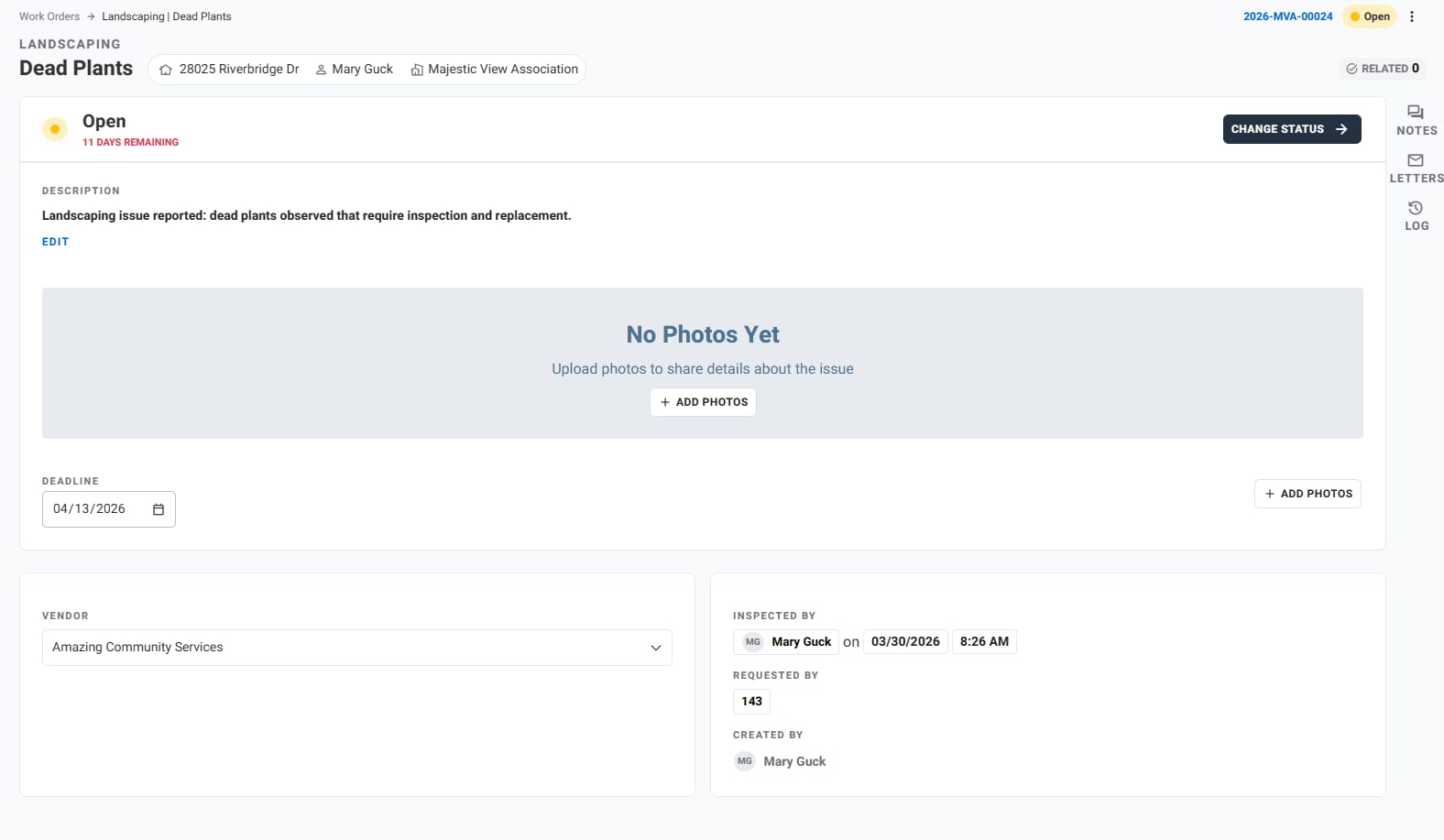
Unit/Address Maintenance Request
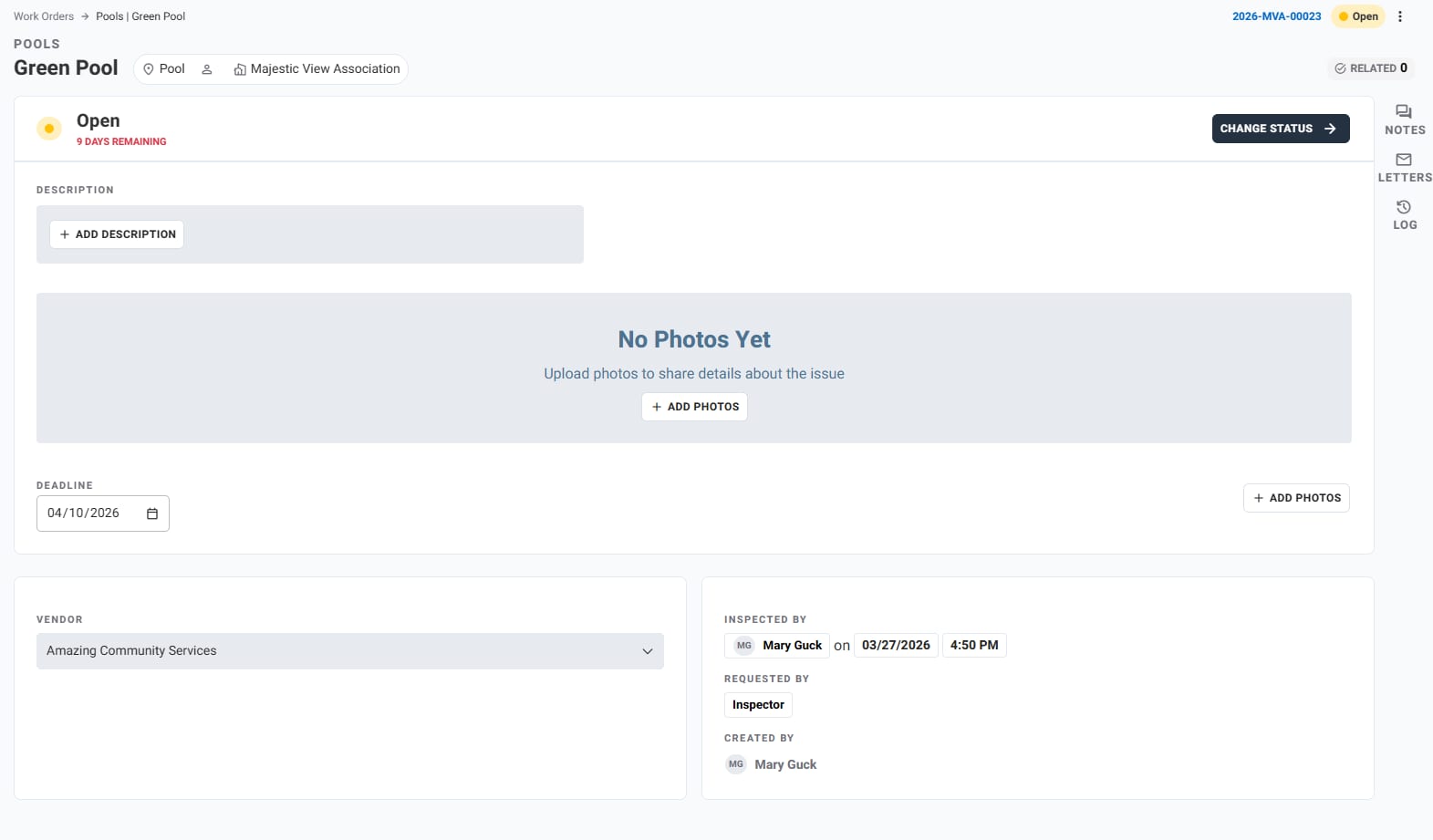
Common Area Maintenance Request
Example Maintenance Request Records
Request: Dead Plants
Location: 28025 Riverbridge Dr
Community: Majestic View Association
Category: Landscaping
Status: Open
Deadline: April 13, 2026
Vendor: Amazing Community Services
Inspector: Mary Guck
Description: Dead plants observed that require inspection and replacement.
Request: Green Pool
Location: Community Pool
Community: Majestic View Association
Category: Pool Maintenance
Status: Open
Deadline: April 10, 2026
Inspector: Mary Guck
Description: Pool water is green and requires treatment and inspection.
Maintenance Data Created
ALLi creates a structured maintenance record aligned with your community’s configuration.
- Request type and category
- Location (unit or common area)
- Community and group
- Status (Open, In Progress, Completed)
- Inspector and vendor
- Issue description
- Deadline or due date
- Photos and attachments
- Activity and history tracking
Managing Maintenance Requests After Creation
ALLi continues to assist with maintenance operations after the request is created.
- Add notes or inspection updates
- Upload photos or documentation
- Assign or change vendors
- Adjust deadlines
- Update status (Open, In Progress, Completed)
- Review maintenance history
Using Maintenance in Workflows
Maintenance requests can be incorporated into Steps for repeatable workflows.
- Create a Step for recurring inspections
- Assign ALLi to generate maintenance requests automatically
- Track completion across multiple properties or areas
Learn more about ALLi Workflows in Steps
Tips for Better Results
- Clearly identify if the issue is unit-based or common area
- Provide a clear description of the problem
- Include vendor or inspector if known
- Set deadlines when possible
- Use photos to improve clarity
Best approach: Start with the location and issue, then layer in assignment and timing details.
What This Feature Does Not Do
- It does not complete maintenance automatically
- It does not assign vendors without instruction
- It does not replace vendor coordination or approvals
- It does not assume missing details without input
How This Fits Into Your Workflow
ALLi simplifies maintenance operations by turning requests into structured, trackable work orders.
- Reduce manual entry and navigation
- Keep service requests organized
- Track vendors and deadlines
- Improve response time and visibility
Best fit: Daily maintenance tracking, inspections, vendor coordination, and operational workflows.
What’s Next
ALLi also supports other operational workflows.
[Insert Link: Violations Management with ALLi]
[Insert Link: Architectural Requests (ARB) with ALLi]