
ALLi - Invoice Approvals and Management
ALLi - Invoice Approvals and Management
ALLi helps you find, review, and approve invoices using simple instructions, allowing you to move invoices through the approval process without navigating multiple accounting screens.
While invoice creation is handled through the accounting workflow via Caliber, ALLi streamlines everything that happens after the invoice is entered, including review, validation, and approval.
Quick Takeaway: Ask ALLi to find or approve an invoice by number, vendor, or community. ALLi retrieves the details and handles the approval step for you.
What ALLi Can Do
ALLi supports the review and approval stages of invoice management.
- Locate invoices by invoice number
- Search invoices by vendor or community
- Review invoice details and line items
- Check approval requirements
- Approve or reject invoices
- Identify invoices pending approval
- Confirm invoices ready for payment
Built for financial workflows: ALLi helps ensure invoices are reviewed and approved efficiently while following your association’s financial controls.
Information Needed to Locate an Invoice
The fastest way to find an invoice is by using the invoice number, but ALLi can also search using other details.
- Invoice Number: Example: 123456
- Vendor Name: Example: ABC Landscaping
- Community: Example: Majestic View Association
- Invoice Date or Amount: Optional for narrowing results
If the invoice number is provided, ALLi can immediately retrieve the correct record.
How ALLi Handles Invoice Approvals
When you ask ALLi to review or approve an invoice, it follows a structured approval process.
Step 1: Locate the invoice
Step 2: Retrieve financial and line item details
Step 3: Check manager approval requirements
Step 4: Check board approval requirements
Step 5: Confirm current invoice status
Step 6: Approve or reject the invoice based on your instruction
This ensures all approvals follow the association’s configured financial governance rules.
Example Instructions
You can work with invoices using natural language.
Find invoice 123456 for Majestic View Association.
Show me invoices pending approval for Majestic View Association.
Approve invoice 123456.
ALLi retrieves the invoice and performs the requested action if approvals are allowed.
What Happens After Retrieval
When an invoice is opened, you can view all relevant financial and approval details in one place.
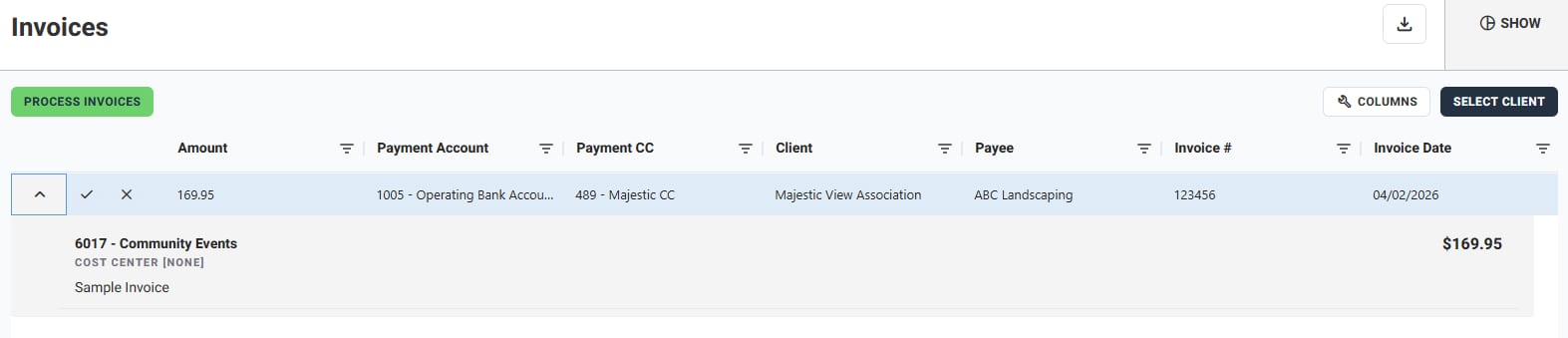
The invoice view typically includes:
- Invoice amount and line items
- Payment account and cost center
- Vendor and community
- Invoice number and date
- Approval actions (approve or reject)
Example Invoice Record
Invoice Number: 123456
Vendor: ABC Landscaping
Community: Majestic View Association
Amount: $169.95
Payment Account: Operating Bank Account
Cost Center: Community Events
Invoice Date: April 2, 2026
Description: Landscaping service
Status: Pending Approval
Invoice Data Available
ALLi surfaces structured invoice data for review and approval.
- Invoice number and ID
- Vendor and payee
- Community and account
- Invoice amount and line items
- Invoice date
- Description of services
- Manager approval status
- Board approval status
- Invoice status (Pending, Approved, Ready to Pay)
Managing Invoices with ALLi
ALLi continues to assist after the invoice is located.
- Approve or reject invoices
- Review invoice details and breakdowns
- Identify missing approvals
- Track invoices pending action
- Confirm invoices ready for payment
Tips for Better Results
- Use the invoice number whenever possible
- Include vendor or community if searching broadly
- Ask for “pending approvals” to prioritize work
- Review details before approving
Best approach: Start with locating the invoice, review the details, then approve or reject as needed.
What This Feature Does Not Do
- It does not create invoices
- It does not bypass approval requirements
- It does not override financial controls
- It does not approve invoices without instruction
How This Fits Into Your Workflow
ALLi simplifies invoice management by turning approval actions into quick, natural interactions.
- Reduce time spent navigating accounting screens
- Speed up invoice approvals
- Maintain compliance with approval workflows
- Improve visibility into financial activity
Best fit: Daily invoice review, approval workflows, and financial oversight.
What’s Next
ALLi also supports other operational workflows.
[Insert Link: Maintenance Requests with ALLi]
[Insert Link: Board Report Agent Walkthrough]