
ALLi - ARB/ARC Creation and Management
ALLi - Architectural Requests Creation and Management (ARB/ARC)
ALLi helps you create, review, and manage Architectural Review Board (ARB) Architectural Review Committee (ARC) requests using simple instructions while ensuring every request follows your community’s architectural workflow.
Instead of manually navigating request forms and tracking documents, you can describe the request in plain language and ALLi will structure it, attach supporting materials, and route it through the review process.
Quick Takeaway: Tell ALLi what the homeowner wants to build or modify, attach any documents, and ALLi will create and organize the architectural request for review.
What ALLi Can Do
ALLi supports the full lifecycle of architectural request management.
- Create architectural requests using natural language
- Attach plans, drawings, and supporting documents
- Organize requests for review workflows
- Add notes and updates for board or staff
- Track request status and progress
- Prepare requests for board or committee review
- Monitor pending or overdue requests
Built for structured approvals: ALLi ensures every request follows the correct workflow, from submission through final board decision.
Information Needed to Create an ARB/ARC Request
To create an architectural request, ALLi must identify the property, the type of project, and the supporting documentation.
Core information includes:
- Property or Unit: Address, unit number, or homeowner name
- Community: Association and group/phase
- Request Type: Example: Deck, Fence, Exterior Paint, Roof
- Project Description: What is being built or modified
Supporting documentation:
- Plans or drawings
- Photos or renderings
- Vendor proposals
- Site plans or surveys
Optional but recommended:
- Timeline or expected completion
- Additional homeowner notes
- Special conditions or requirements
How ALLi Creates an ARB/ARC Request
ALLi follows a structured process to ensure the request is properly configured.
Step 1: Locate the property
Step 2: Identify the community’s architectural configuration
Step 3: Retrieve available request types
Step 4: Organize project details and attachments
Step 5: Create the request and assign it to the workflow
This ensures every request follows the association’s architectural review standards.
Example Instructions
You can create architectural requests using natural language.
Create an architectural request for 28025 Riverbridge Dr. Request type: Deck. Homeowner wants to build a new backyard deck. Attach deck plans and site layout.
Submit an ARB request for [address]. Type: Exterior Paint. Homeowner is requesting a color change. Include submitted color samples and photos.
ALLi converts this into the structured request and attaches all relevant documentation.
What Happens After Creation
Once created, the request enters the architectural review workflow.
The request is organized into stages and can include multiple review steps such as verification, additional information requests, and board approval.
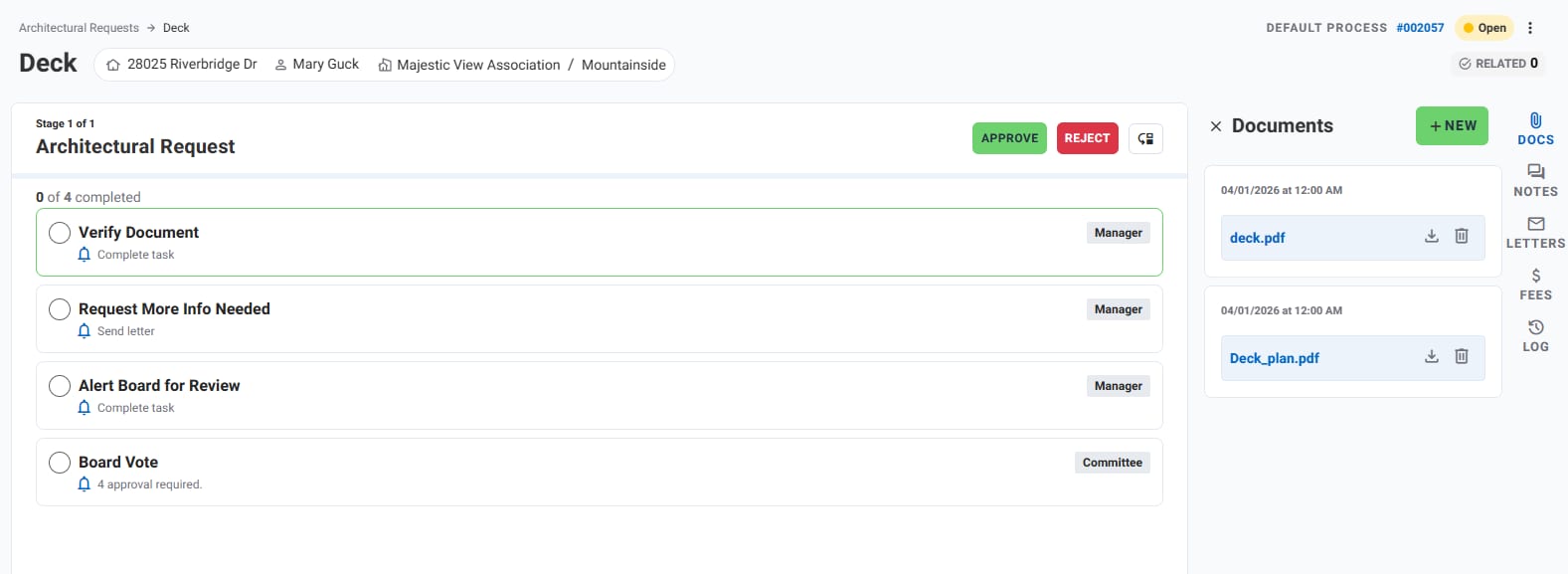
The system supports:
- Multi-step review processes
- Manager and committee roles
- Approval or rejection actions
- Document tracking alongside the request
- Note Tracking/Creation
Example Architectural Request Record
Request: Deck Installation
Property: 28025 Riverbridge Dr
Homeowner: Mary Guck
Community: Majestic View Association – Mountainside
Status: Open / Pending Review
Stage: Architectural Request
Tasks:
- Verify Document
- Request More Info
- Alert Board for Review
- Board Vote
Documents: deck.pdf, Deck_plan.pdf
Submission Date: April 1, 2026
ARB/ARC Data Created
ALLi creates a structured architectural request aligned with your community configuration.
- Request type and category
- Property and homeowner
- Community and group
- Status and workflow stage
- Project description
- Attached documents
- Review tasks and steps
- Submission and activity tracking
Managing ARB/ARC Requests After Creation
ALLi continues to support the architectural review process after submission.
- Attach additional documents or updates
- Add notes for staff or board members
- Track review progress and stages
- Prepare requests for board meetings
- Approve or reject requests
- Monitor pending or delayed requests
Using ARB/ARC Requests in Workflows
Architectural requests can be part of larger workflows using Steps.
- Create a Step to review pending ARB/ARC requests
- Assign the Step to ALLi
- Have ALLi summarize requests or prepare board-ready summaries
Learn more about ALLi Workflows in Steps
Tips for Better Results
- Be clear about the project type and scope
- Include all available documents
- Provide a clear description of the request
- Use natural language, ALLi will structure it
- Include timelines if known
Best approach: Provide the project type and documents first, then refine with additional details if needed.
What This Feature Does Not Do
- It does not approve requests automatically
- It does not bypass architectural review workflows
- It does not replace board or committee decisions
- It does not assume missing project details without input
How This Fits Into Your Workflow
ALLi simplifies architectural request management by organizing submissions and guiding them through structured review workflows.
- Reduce manual request entry
- Keep documentation organized
- Ensure consistent review processes
- Support board and committee decisions
Best fit: Architectural submissions, board review workflows, and communities with structured approval processes.
What’s Next
ALLi also supports other operational workflows.
[Insert Link: Violations Management with ALLi]
[Insert Link: Maintenance Requests with ALLi]