
Year End Accounting Process
 Year End Accounting Process
Caliber, unlike most other accounting software, does not have a Year End Closing process that needs to be completed. As a result, nothing needs to be done at the end of the year to “close the books”.
Caliber will automatically start including the prior year’s Net Income as part of the Retained Earnings calculation on the first day of the new fiscal year. This is just a change of where that amount is reported, so no journal entry will be created or visible in the General Ledger. The only entries that will ever be found in the Retained Earnings account are those made by an actual user, which essentially become ‘adjustments’ to the calculated amount.
Reports run as of the last day of the year will always show the Net Income for the current year. The Net Income for the year is not reported as part of the Retained Earnings and the Net Income does not reset to zero until the new fiscal year has actually begun.
It is recommended, but not required, that the last month of the prior year be closed to prevent accidental posting into it. Users with Administrator level permissions will still be able to post into the closed period if needed, but non-Administrators will not.
 Set-Up
The Retained Earnings account is selected by going to:
Client Info Toolbox > Accounting Setup > Accounting Tab
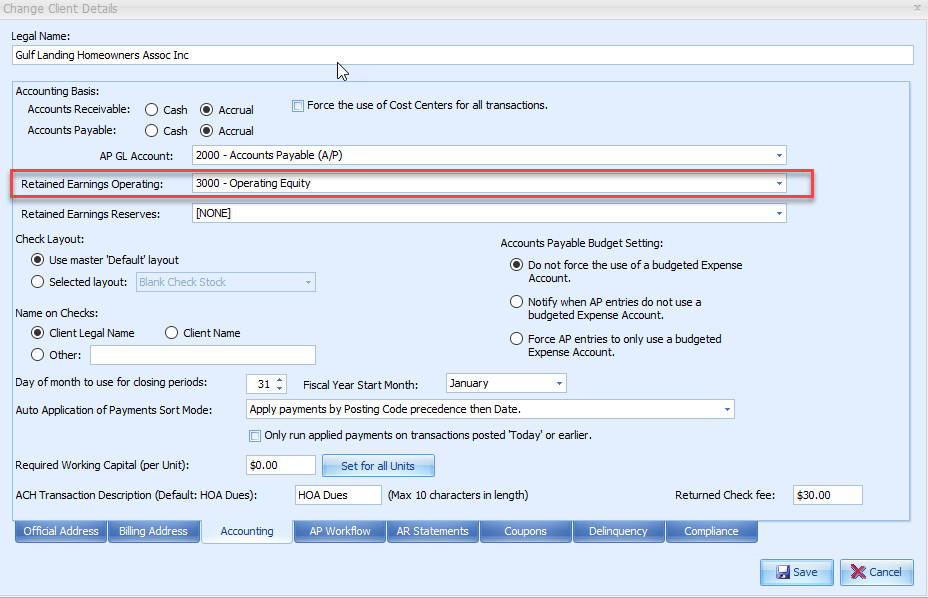
Select the General Ledger account where the Operating Retained Earnings are to be reported and Save.
If no Retained Earnings account is selected here, Caliber will report the balance on a separate line on the Balance Sheet called ‘Retained Earnings.’ However, because this line is not tied to a General Ledger account number, it will not be possible to post any adjusting entries into it.
A Reserve Retained Earnings account only needs to be selected if the client is using the ‘Reserve Income’ and ‘Reserve Expense’ account types.
If the client uses the calendar fiscal year, the appropriate 1096 and 1099 forms will need to be generated according to IRS requirements. Instructions for this can be found in our ‘1099 and 1096 Output’ document.