Vendor Merge
We’re updating this article. Some screenshots or names may look older than what you see in the product.
Vendor Merge allows you to merge one Vendor into another Vendor. This will cause all Invoices and Work Orders to be merged into the selected Primary Vendor. The Vendor that was merged into the Primary Vendor will no longer be visible in the system after the merge is completed.
You can perform a Vendor Merge from the Vendor Toolbox located on the Home or Client level.
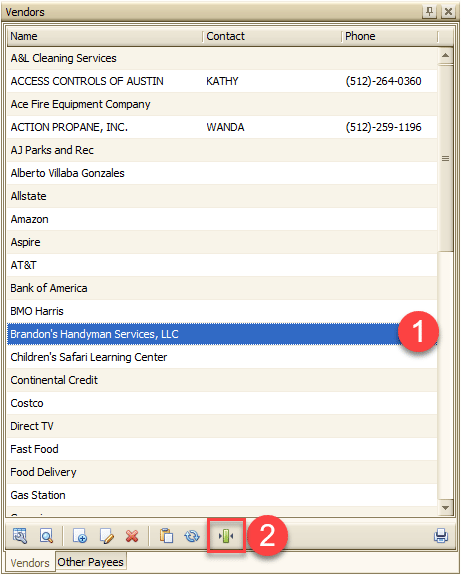
1) Select the Primary Vendor
2) Click on the Merge Icon at the bottom of the Vendor Toolbox
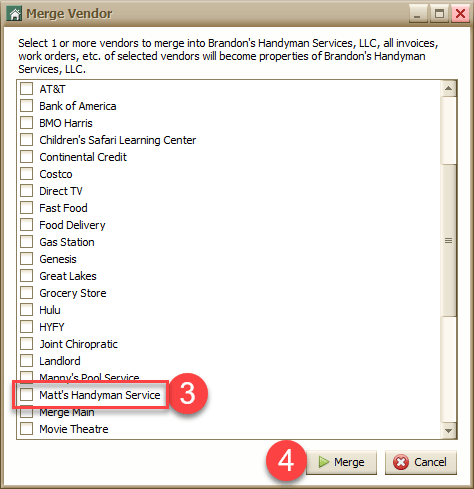
3) Select the Vendor in which you want merged into the Primary Vendor
4) Click Merge
This example shows Matt’s Handyman Service being merged into the Primary Vendor (Brandon’s Handyman Services, LLC).
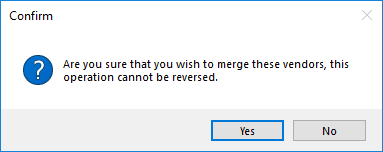
Confirm the merge and then it will be completed.