
Manager - Suspending/Deleting an Account

Managers can suspend Director, Concierge, Owner, and Tenant accounts, if they would like that person to no longer have access to the site.
Please note: There is not currently an option to delete users. This is due to their site activity (posts, comments, document uploads, etc.) being tied to their account and deleting the user would delete any action(s) the user made on the Community portal.
To suspend a user follow the below instructions:
1. Select

2. Select the sub menu

3. Use the search bar to locate the person.
4. Select the arrow on the right-hand side of the View button next to the specified user.

5. Select the Suspend button.
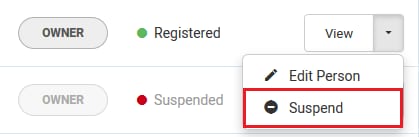
6. Alternatively, you can suspend from within a person’s profile by selecting View instead of the arrow.
7. Once in the person’s profile select the
 button.