
Site Admin - AssociationVoice - Site Creation and Integration Configuration
Background
Based on customer feedback, AssociationVoice has been redesigned to allow site administrators to easily create sites on their own, without the need to call AssociationVoice support. Along with this change, site administrators can configure integrations.Notes
- The feature is available to all users as follows:
- Site Administrators: Copy site-wide code and configure integrations.
- Availability - This enhancement will be activated and available to all customers with site creation permissions.
Features
This enhancement provides the following features:- Copy Site-Wide Code – Allows for automatic copy of site wide code to create a new website.
- Configure Integrations – Allows Site Administrator to set up integrations
Updates to the Site Creation Functionality in AssociationVoice
As a Site Administrator in AssociationVoice, you may have the ability and permission to self-provision sites. The process of self-provisioning has been enhanced with functionality to automatically copy site-wide code and to configure the integrations.
Copy Site-Wide Code
This feature allows the Site Admin to create another website.
As a Site Administrator in AssociationVoice, you may have the ability and permission to self-provision sites. The process of self-provisioning has been enhanced with functionality to automatically copy site-wide code and to configure the integrations.
Copy Site-Wide Code
This feature allows the Site Admin to create another website.
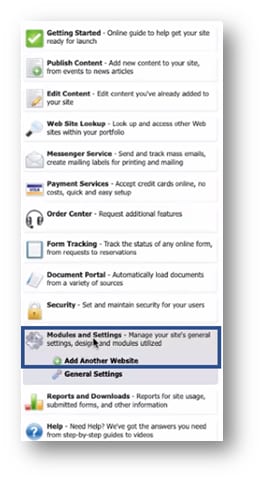
- Select Publish > Modules and Settings > Add Another Website.
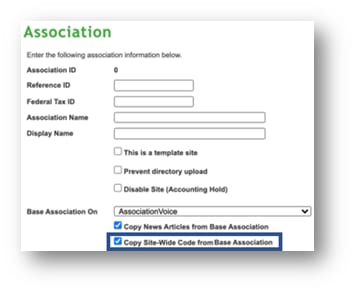
- When choosing the Base Association for the new site, the option Copy Site Wide Code from Base Association is checked by default. If this option is checked when the new site is created, the site-wide code is automatically copied from the base site. Uncheck the option if the site-wide code should not be copied from the base association to the new site.
Configure Integrations
For any site that does not have an integration set up, Site Administrators can access integration set up on the General Settings page. Site Administrators cannot access the integration setup if settings are inherited from the parent site, which typically applies to the following integrations: Jenark, VMS, QuickBooks, and FSR.
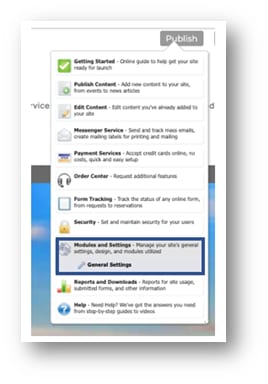
- Select Publish > Modules and Settings > General Settings.
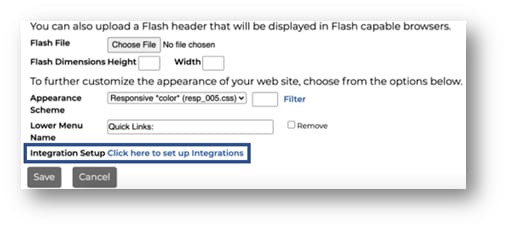
- Select Click here to set up integrations. This option will be disabled once the integration has been set up.
- Select the integration that applies to the selected association.
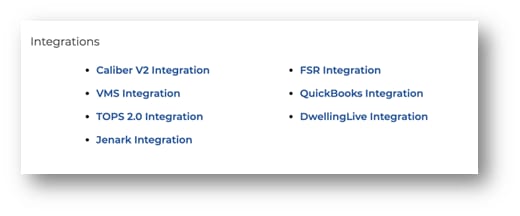
- Each page will have different fields and required data. We recommend contacting a Customer Service Manager before setting up the first integration.