
Resident- Revoke Guest Passes
We’re updating this article. Some screenshots or names may look older than what you see in the product.
Background
To provide homeowners more control and improve security, we have added the ability for homeowners to immediately revoke a guest pass from their Visitor Management page.We have also added the functionality to revoke all guest passes when a guest is deleted.
Features
To Revoke a guest pass, navigate to the ‘Guest History’ then find the guest you are looking for. Once you find them click the 'Revoke' option under the 'Status' column.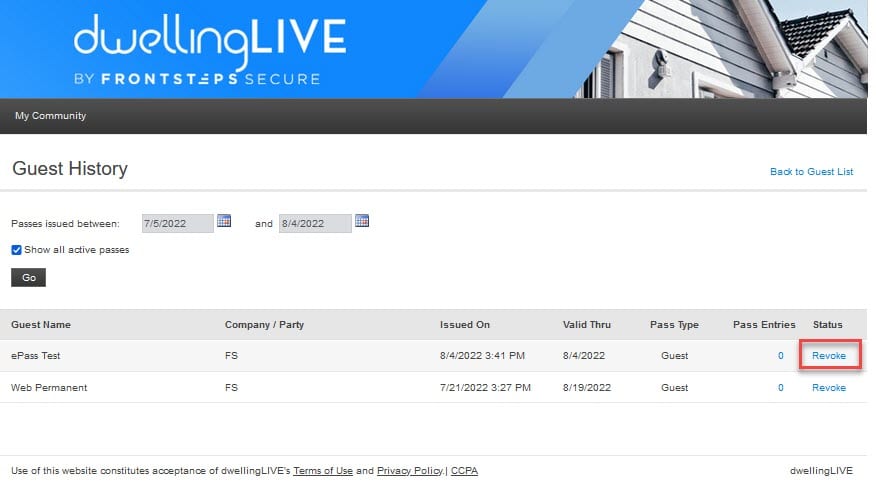
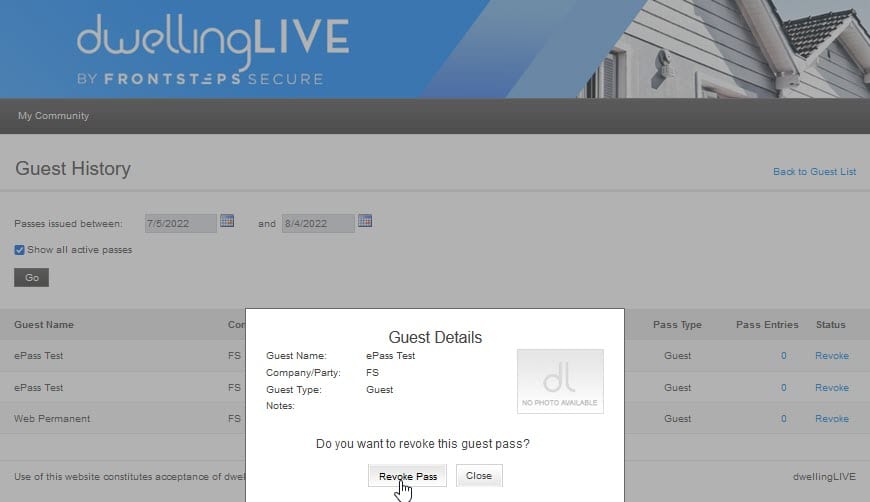
You can then view the details of the guest pass and will have to verify that you would like to Revoke the guest pass by clicking the ‘Revoke Pass’ button.
Additionally, if you choose to delete a guest from your property, all associated guest passes will be revoked. When deleting a guest, a popup will appear informing you of this.