Resident - Payment Module Interface Update
We’re updating this article. Some screenshots or names may look older than what you see in the product.
Background
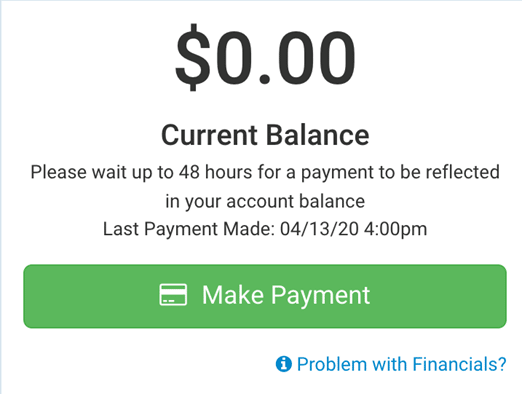
When the Resident made a payment, there was no verbiage explaining the timeline for the payment to process. Likewise, there was no indication of the date the last payment was made.
Solution
Verbiage was added to the Make Payment window on the Resident Dashboard to provide Residents with this information:
Ø “Please wait up to 48 hours for a payment to be reflected in your account balance.”
Ø A “Last Payment Made” date and timestamp
Notes
Ø Payment timestamps will only display if a payment is made after the release date. It will not display retro-active payments prior to this release date.
From the Resident Dashboard, or from Quick Actions>My Payments view the Make Payment window.