Resident - Mobile App Facility Reservations Social Distancing Feature
We’re updating this article. Some screenshots or names may look older than what you see in the product.
Background
The Facility Reservations application has been enhanced to accommodate social distancing requirements.Community Managers can now set limits on the number of people participating in an event in a facility.
The main purpose for this information is for contact tracing for a situation such as a potential virus infection occurring at the event.
Reserving a Facility With Social Distancing Restrictions
From the FRONTSTEPS Mobile App menu, select My Requests and Reservations, then select Community Reservations.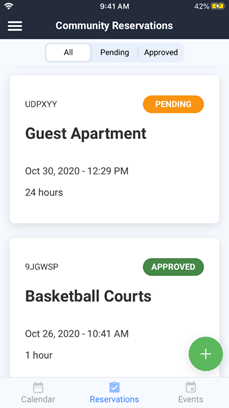
From the Community Reservations screen, select the + option.
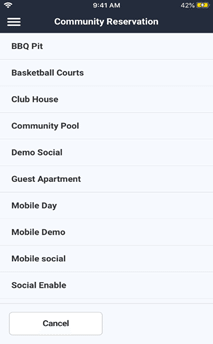
- Select the Facility you wish to reserve.
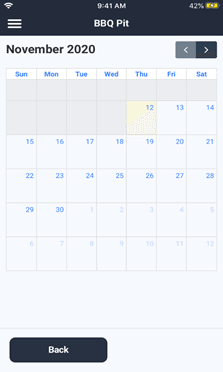
- Select the date of the reservation.
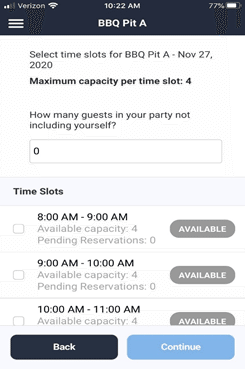
- On the Select time slots for <selected date> screen, select the time slots for which you are reserving the Facility.
- Using the Available Capacity per time slot guideline, enter the appropriate number in the How many guests in your party not including yourself? field. Select Continue.
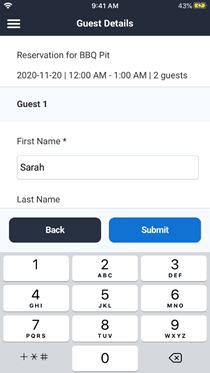
The Guest Details screen requires guest contact information. The main purpose for this information is for contact tracing for a situation such as a potential virus infection occurring at the event.
- Complete the Guest information for each of your guests. First Name and Phone Number are required. Last Name and Email are optional.
- Select Submit. A confirmation window will display. Select Yes to confirm, Cancel to cancel.
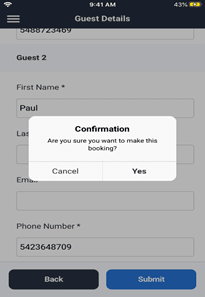
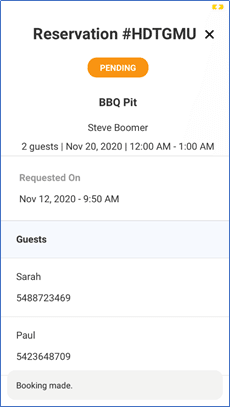
- When you select Yes, your reservation request is submitted to the community Manager for approval. Your request appears on the App in Pending status. If Approved, the status will change to Approved.