
Resident - Mobile App: View Classified Ad Attachments and In-App Survey
We’re updating this article. Some screenshots or names may look older than what you see in the product.
Two features have been added to the Resident Mobile App:
- View Classified Ad Attachments - Users of the Resident Mobile App could previously view Classified Ads, but not the attachments associated with the ads. Residents can now view the Classified Ad Attachments.
- In App Survey – Users can complete a survey asking for a rating on the Resident Mobile App.
View Resident Mobile App Classified Ad Attachments
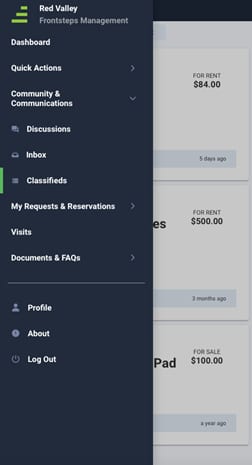
From the FRONTSTEPS Mobile App menu, select Community & Communications, then select Classifieds.
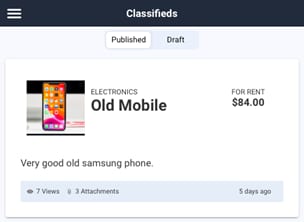
Review the Classified Ads listed on the Classifieds page.
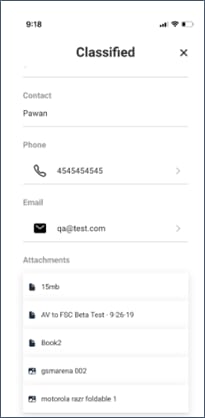
To view the detail and attachments for a Classified Ad, select the Ad.
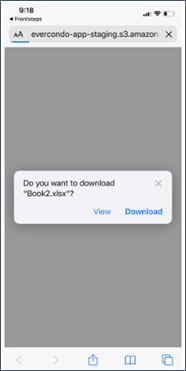
Select an option to View or Download the Attachment.
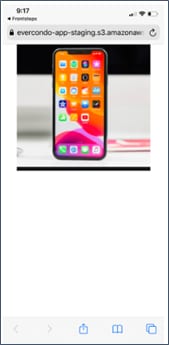
2. To view an Image, select the Attachment. The image will display.
Complete Resident Mobile App In-App Survey
Log into FRONTSTEPS using the Mobile App. A window appears giving you the option to complete a survey regarding the FRONTSTEPS Mobile App.
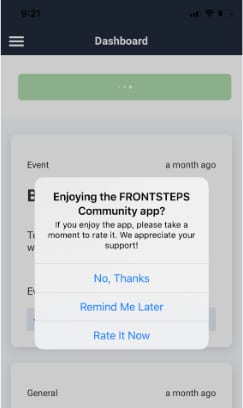
To complete the survey, select Rate It Now.
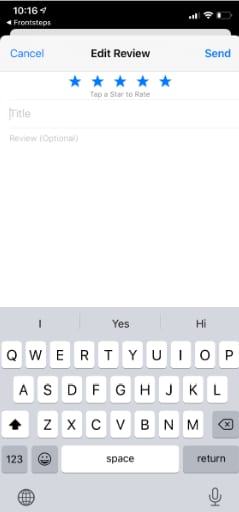
On the Edit Review screen, select a Star for a rating from 1 to 5, the 5th being the best rating and the 1st star being the worst rating. In the Review area, enter additional comments as desired.
Select Send to submit the Review.
Select Cancel to exit the Review window without submitting a review.
From the FRONTSTEPS Mobile App menu, select Community & Communications, then select Classifieds.
Review the Classified Ads listed on the Classifieds page.
To view the detail and attachments for a Classified Ad, select the Ad.
- To view an Attachment that is a document, select the Attachment.
Select an option to View or Download the Attachment.
2. To view an Image, select the Attachment. The image will display.
Complete Resident Mobile App In-App Survey
Log into FRONTSTEPS using the Mobile App. A window appears giving you the option to complete a survey regarding the FRONTSTEPS Mobile App.
To complete the survey, select Rate It Now.
On the Edit Review screen, select a Star for a rating from 1 to 5, the 5th being the best rating and the 1st star being the worst rating. In the Review area, enter additional comments as desired.
Select Send to submit the Review.
Select Cancel to exit the Review window without submitting a review.