Resident - Mobile App Create a Classified Ad
We’re updating this article. Some screenshots or names may look older than what you see in the product.
Background
Residents can use the FRONTSTEPS Mobile app or the FRONTSTEPS Community website to create classified ads to sell or items to other Residents. Classifieds can also be posted for items they are 'In Search Of'Note:
- Classified Ads must be approved by Managers before they can be viewed by other community members. All Ads will be in “review” status and visible only to the submitting Resident until approved.
- There is a Published tab and a Pending tab on the Classified Ad feature. Residents can view their Classified Ads that are awaiting review in the ‘Pending’ tab. The Ads will automatically be moved into the ‘Published’ tab upon management approval.
Creating a Classified Ad
From the FRONTSTEPS Mobile App menu,
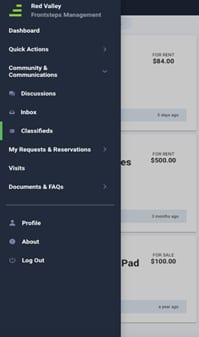
select Community & Communications, then select Classifieds.
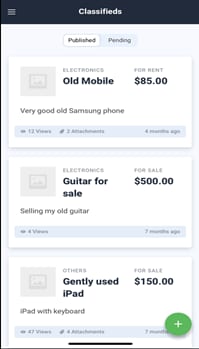
Select the Add option +.
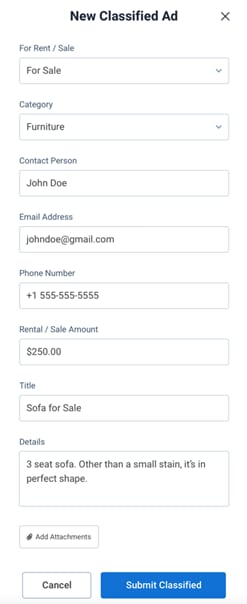
- Complete all applicable information for your Classified Ad. Your Name, Email Address, and Phone Number will automatically populate based on the information in your profile. You can edit this fields.
- To add Attachment(s) to the Classified Ad, select the Add Attachments option, then complete the process to download the Attachment(s) from your mobile device.
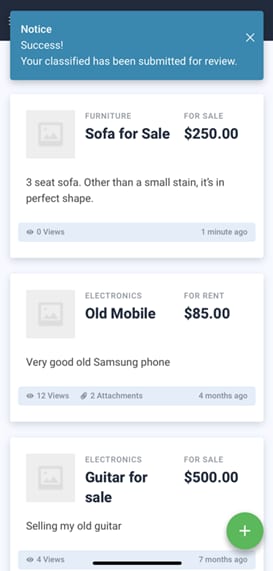
- Select Submit Classified. Your request is submitted to your Community Manager for review. You are redirected to the “Pending” tab where you will see a message indicating your Ad has been submitted for review. Once the Manager approves the Ad, it is published to the Community site and will display in the “Published” tab of your Mobile App.