
Resident - Mobile App Community Directory Privacy Setting
We’re updating this article. Some screenshots or names may look older than what you see in the product.
Background
Community Managers can enable the Community Directory to be viewed by Residents. Residents can then opt to display their own Directory information to other Residents using a setting in the Resident Profile information.Previously, this functionality was only available through the FRONTSTEP portal, but it is now also available in the FRONTSTEPS Resident Mobile App.
Community Directory Privacy Settings
From the FRONTSTEPS Mobile App menu,
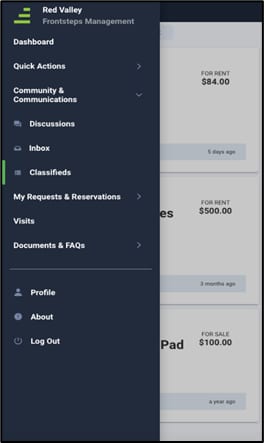
select Profile. The My Profile screen displays.
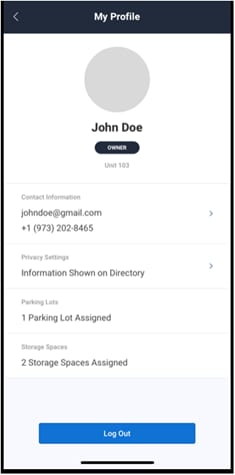
In this example, the verbiage “Information Shown on Directory” indicates that the Resident has opted to have their Directory information viewable by other Residents. If the Resident has opted not to have their Directory information viewable by other Residents, that verbiage would display here as well.
To change Privacy Settings, touch the Privacy Settings section.
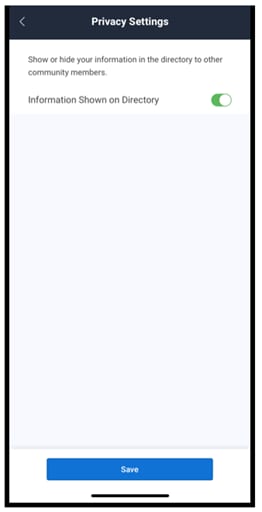
To opt to have Directory information displayed, slide the Information Shown on Directory button to the right until the green indicator is displayed.
To opt to not have Directory information displayed, slide the Information Shown on Directory button to the left until the green indicator is no longer displayed.