
Resident-FRONTSTEPS Mobile App Visitor Management-Vendors
We’re updating this article. Some screenshots or names may look older than what you see in the product.
Notes
- The feature is available to all users as follows:
- Residents with the Mobile App
- Availability - This enhancement will be activated and available to all customers who purchase the Visitor Management Product integration.
Features
This enhancement provides the following features:
- Allows Residents to select from a community approved list of Vendors.
Visitor Management on FSC Mobile App for Residents
Homeowners can manage Guests, Parties, and their personal Settings from the FSC Mobile App, just like they can on the FSC web portal. The interface for the mobile app links directly into dwellingLIVE.
The Home Page
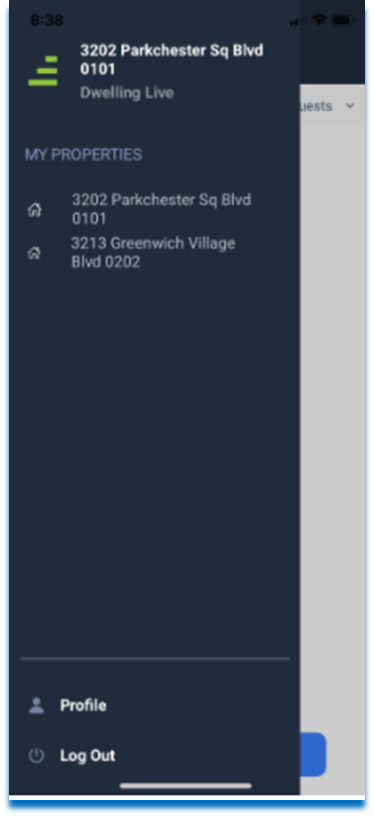
The Home page lists the homeowner’s properties, as well as Profile data and the ability to log out.
Vendors
- From the Manage Guests button, select Manage Vendors.
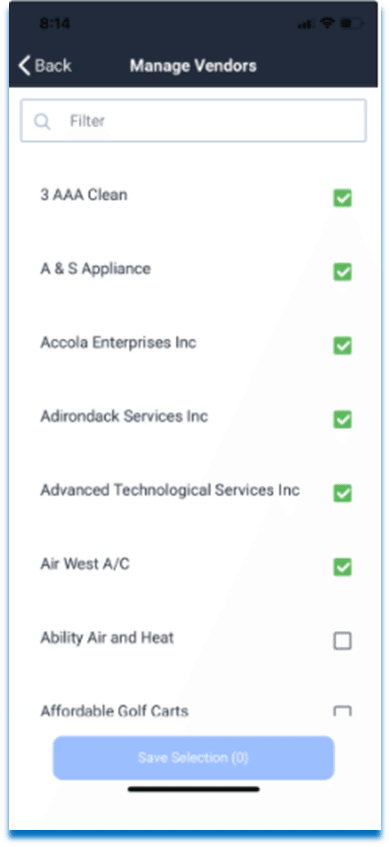
- Homeowners can Filter by Vendor name. Then use the checkbox to save a preferred Vendor from the community approved list.
- When the Save Selection button, is pressed the homeowner can quickly access their preferred Vendor selections.
To Remove Vendors from the homeowner’s Guest List:
- Select the Vendor from the Guest List.
- Select the carrot > next to the Vendor name.
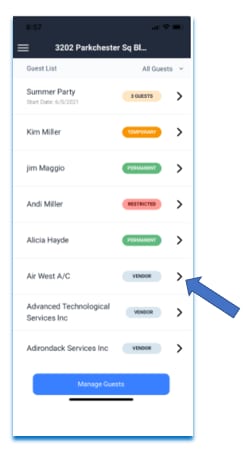
3. Uncheck the Vendor.
4. Choose Save Selection.
4. Choose Save Selection.