
Resident-FRONTSTEPS Community- Visitor Management-Manage Vendors
We’re updating this article. Some screenshots or names may look older than what you see in the product.
Notes
- The feature is available to all users as follows:
- Residents
- Availability - This enhancement will be activated and available to all customers who purchase the Visitor Management Product integration.
Features
This enhancement provides the following features:- Viewing Vendors
- Removing Vendors from the homeowner Vendor list.
- Adding Vendors to the homeowner’s Vendor list.
Approved community Vendors are assigned to the Unit by the homeowner. The homeowner can view and manage their Vendors.
To View a Vendor:
- Select Visitor Management from the menu options.
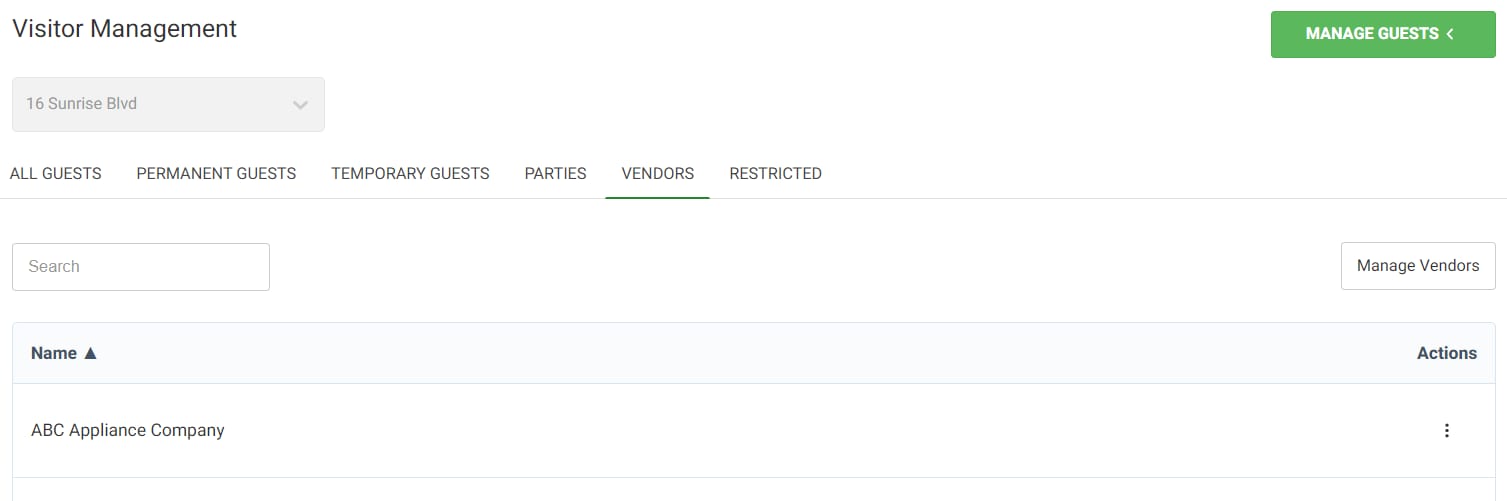
- Select the Vendor tab. Vendors assigned to the unit will display.
To Add Vendors:
- Select Visitor Management from the menu options.
- Select the Vendor tab.
- Select the Manage Vendors button.
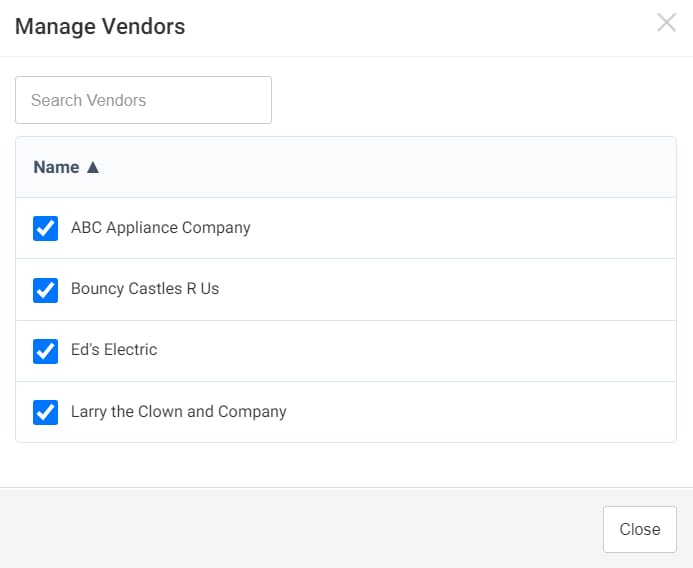
- Vendors can be added to the list of Vendors for the Unit by checking the box next to the Vendor name. Note: This list of community approved Vendors pulls in from data set up in dwellingLIVE. There is no capability to add a Vendor here.
- Select Close.
To Remove a Vendor:
- Select the Manage Vendors button.
- Vendors can be removed from the list of Vendors for the Unit by unchecking the box next to the Vendor name.