
Refunding a Homeowner’s Payment – FSPay 3.0
We’re updating this article. Some screenshots or names may look older than what you see in the product.
Refunds can be initiated through the FSPay Dashboard on the Payments screen. Refunds can only be initiated for payments that have succeeded (with a status of Succeeded). The action ‘Refund’ will be available for these payments.

To initiate a refund for a payment:
Note: Refunds for ACH (eCheck) payments can take 5-10 business days to be posted back into the homeowner’s bank account.
To initiate a refund for a payment:
- Search for and find the payment to refund.
- Click Refund
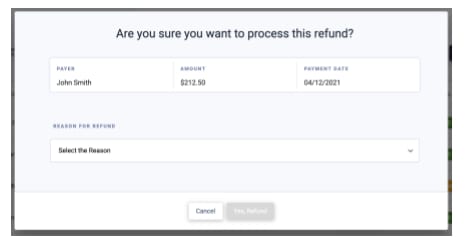
- A prompt will appear to:
- Confirm the details of the payment to refund.
- You will need to select a reason for the refund.
- Once a reason is selected, Yes, Refund will be available to initiate the refund.
Note: Refunds for ACH (eCheck) payments can take 5-10 business days to be posted back into the homeowner’s bank account.