
Resident - Owners Access Multiple FRONTSTEPS Communities Using One Portal Login
We’re updating this article. Some screenshots or names may look older than what you see in the product.
Background
Owners may have properties located in different FRONTSTEPS Communities. A feature has been added to give owners access to all FRONTSTEPS Communities within which they own units, without having to log in separately to each Community portal or use separate login credentials. Once an owner logs into one Community portal, they can switch between Community portals using a simple drop-down menu.
Note: In order to have this functionality, the owner must successfully register for each Community portal using the same login email address and password. Once successfully registered for each portal, the owner can switch between each one without having to establish different credentials or log in multiple times.
Access Multiple Communities
Once you have registered for each community portal, log into one of your FRONTSTEPS Communities.
In the upper left-hand corner, you will see the name of the Community you have logged into.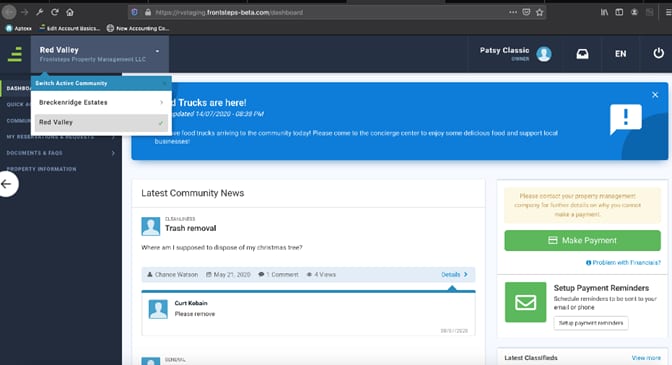
Select the drop-down arrow to the right of the Community name.
The Switch Active Community drop-down menu will appear. All FRONTSTEPS Communities for which you have the same login will display on this menu.
To switch Communities, select the Community name. You will be redirected to that Community’s portal.