Manager: Work Order Settings
We’re updating this article. Some screenshots or names may look older than what you see in the product.
Background
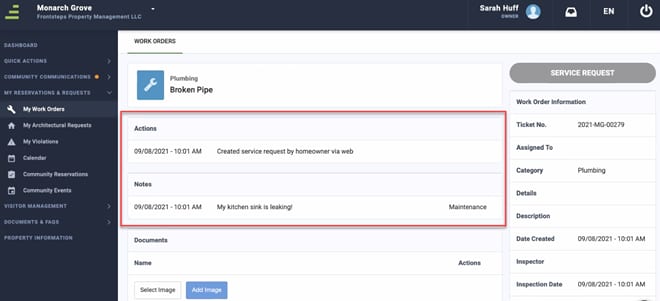
Based on customer feedback, FRONTSTEPS has added a new Work Order Setting options for Community Managers. This new Feature allows Managers the option to turn off the visibility of Actions and/or Notes on Work orders within FSC.Accessibility
The feature is available to all users as follows:- Managers: Have the ability to adjust these settings.
Features
This enhancement provides the following features:- Show Actions to Residents- when this feature is on, it will show the Actions within the Work Order details to Residents. This applys to both FSC Web and Mobile.
- Show Notes to Residents- When this feature is on, it will show the Notes within the Work Order details to Residents. This applys to both FSC Web and Mobile.
Work Order Settings
To access these settings, the Manager will navigate to the Settings Gear > Accounting Settings and Work Order settings.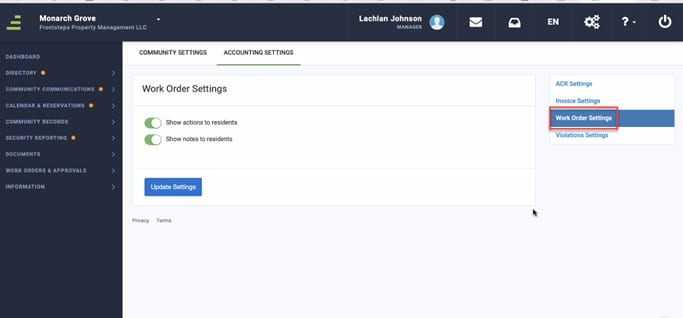
The Community Manager can choose to enable either of these features for their community.
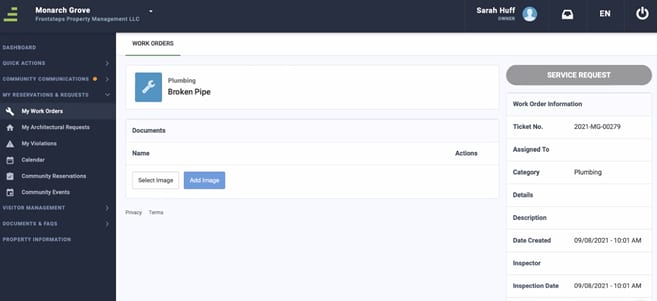
If the Features are turned OFF this is the view the resident will see when they Navigate to their Work Orders:
If the Features are turned ON this is the view the resident will see when they Navigate to their Work Orders: