
Manager – Resident Data That is Updated in Caliber from FRONTSTEPS
We’re updating this article. Some screenshots or names may look older than what you see in the product.
Background
When FRONTSTEPS is integrated with Caliber as the Accounting Integration provider, some Resident information that is updated in FRONTSTEPS will be updated in Caliber only when the information is updated on the Property Information screen. Information updated in the standard Resident profile will not be updated in Caliber.Updating Resident Information in Caliber from FRONTSTEPS
From the FRONTSTEPS Resident Dashboard, select the Property Information menu option.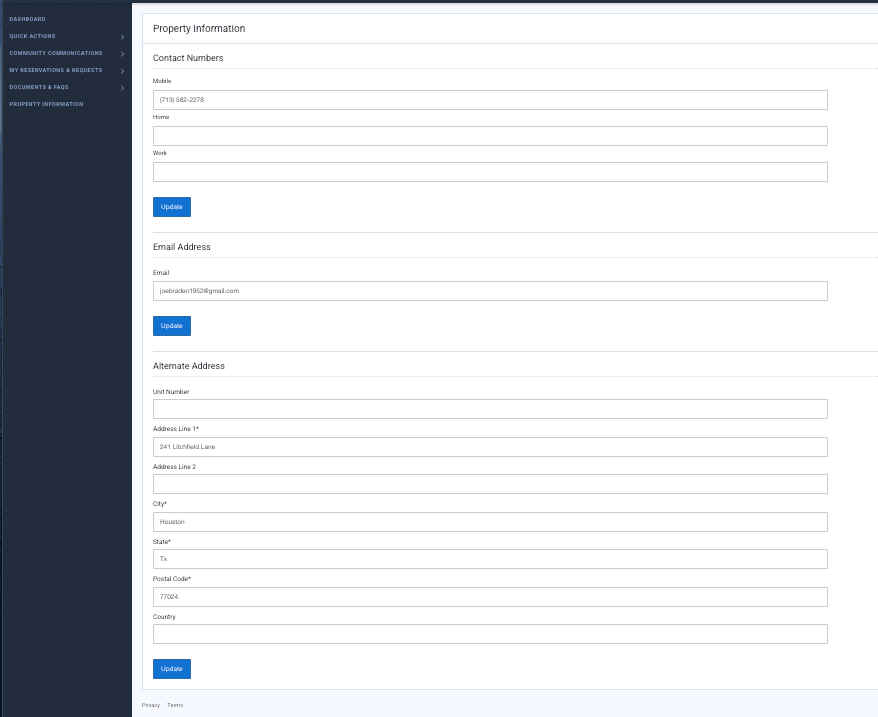
Changes made to the following information will also be made in Caliber:
- Phone: Mobile, Home, Work
- Email address
- Alternate address