Manager: Director Directory Opt In
We’re updating this article. Some screenshots or names may look older than what you see in the product.
Background
Based on customer feedback, FRONTSTEPS has added a new setting for Community Managers. This feature allows Managers to Opt In Director information to show on FSC Mobile and Web Directories.Accessibility
The feature is available to all users as follows:- Managers: Have the ability to enable this feature.
Availability - This enhancement can be activated for all customers. It is defaulted to be off if a customer is interested, they must contact a FRONTSTEPS employee to assist in the setup.
Features
This enhancement provides the following features:- Director Opt-In– when a manager enables this feature, Directors within that community cannot choose to Opt Out of having their information show on the Directory.
Director Opt-In
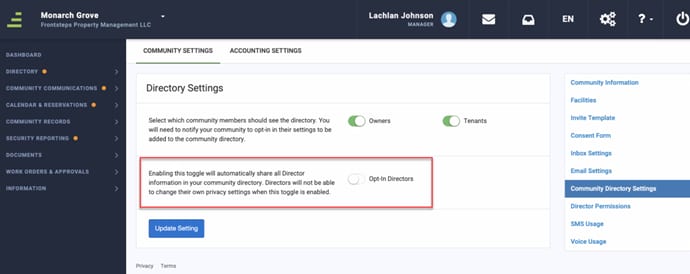
This setting is for Managers to turn on when they want to ensure the Community Directors information is displayed within the Community Directory.With this setting enabled, Directors information (name, phone number, etc) will show within the Directory in FSC.
The Directors CANNOT Opt Out of showing their information if this setting is in use.
This setting is applicable to both FSC Web and Mobile.
Sub-functionality
If the customer wants to use this feature they will need to reach out to an Internal FRONTSTEPS Employee.Once the option for this feature has been enabled by a FRONTSTEPS Employee, the Community Manager can turn the setting on.
Within the Manager View on FSC the user will need to click the gear icon, choose Community Settings and then choose Community Directory Settings from the menu.
They will now see the Option to share the Directors information on their Community Directory.
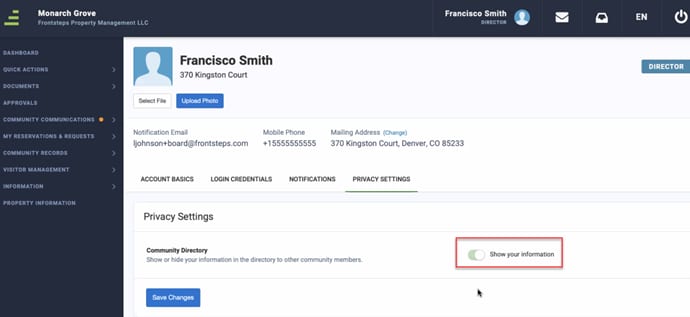
When this Setting turned on, within the Directors view and their Privacy Settings the switch that would allow them to Opt Out of showing their information has been disabled.