
Manager- Community Invoice Settings
Background
Based on customer feedback, FRONTSTEPS has added new Invoice Setting options for Community Managers. This new Feature allows Managers to select the Group that is authorized to Approve Invoices.
Accessibility
The feature is available to all users as follows:
Invoice Settings
To access these settings, the Manager will navigate to the Settings Gear (1) > Accounting Settings (2) and Invoice settings (3).
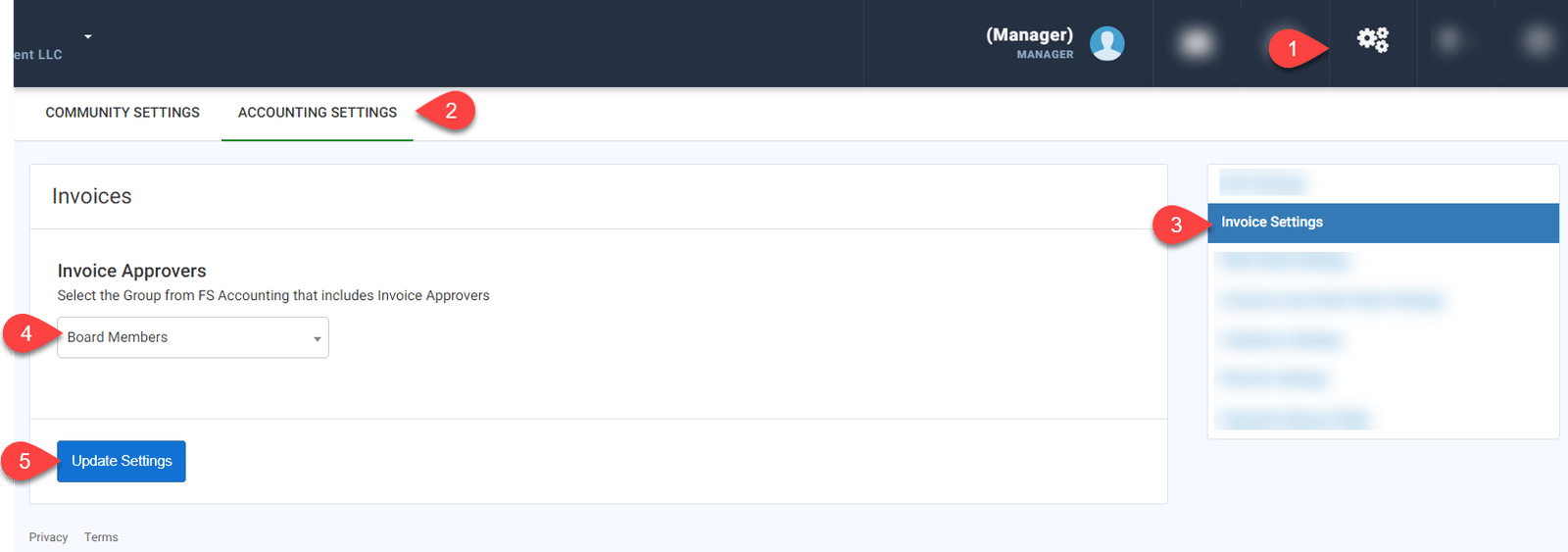
The Community Manager can choose which Group in authorized to approve invoices (4). Once complete click ‘Update Settings’ (5).
Based on customer feedback, FRONTSTEPS has added new Invoice Setting options for Community Managers. This new Feature allows Managers to select the Group that is authorized to Approve Invoices.
Accessibility
The feature is available to all users as follows:
- Managers: Have the ability to adjust these settings.
Invoice Settings
To access these settings, the Manager will navigate to the Settings Gear (1) > Accounting Settings (2) and Invoice settings (3).
The Community Manager can choose which Group in authorized to approve invoices (4). Once complete click ‘Update Settings’ (5).