
License Plate Reader (LPR) Installation Project Planning
LICENSE PLATE READER (LPR) INSTALLATION PROJECT PLANNING
License plate reader systems consist of IP cameras communicating over the community’s local network to an on-premises PC running software to do image processing. That PC can also connect to the Gatehouse Application running in a gatehouse on the same local network. Both systems send data to the FRONTSTEPS Dwelling portal.
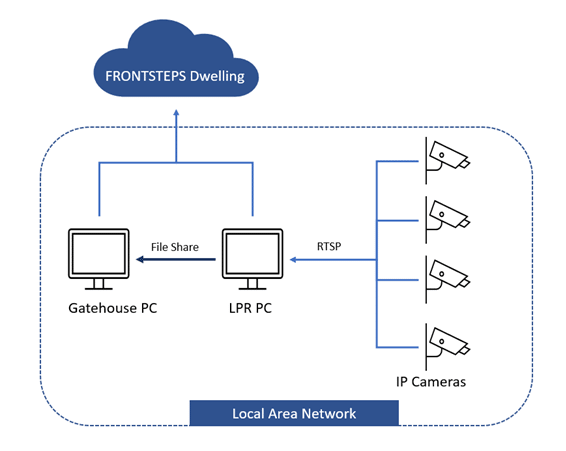
Figure 8 - Typical License Plate Reader setup
Questions to ask when planning an installation:
QUESTIONS FOR THE COMMUNITY |
CLARIFICATIONS ON WHY TO ASK THESE QUESTIONS |
|
Are there multiple lanes for that community entrance that need a camera? |
Each License plate reader PC, used for both Tagmaster and OpenALPR systems, can support up to 4 Cameras (1 camera per lane). If more than 4 cameras with simultaneous streaming to an LPR PC are needed, another PC will be required. |
|
Are there existing cameras in use that will also be used as input for the License Plate Reader software? |
IP Cameras must allow multiple channels of streaming and support RTSP if used for multiple functions. |
|
Will the installation use Tagmaster or OpenALPR software? |
Tagmaster software must be used with CitySync Cameras. OpenALPR software can connect to any IP camera if it supports streaming over RTSP. |
|
Will the IP cameras used for the License Plate Reader system be on the same network as the License Plate Reader PC? |
If not, port forwarding will need to be configured for streaming video between different networks. |
|
Will sending data to a Visitor Station PC be needed? |
The license plate number and image can be sent to a Visitor Station PC on the same local network. The Gatehouse Application can use that data to automatically fill in the license plate number field when creating passes. |