
Hardware Introduction
1. INTRODUCTION
There are two major systems in FRONTSTEPS Dwelling that interact directly with supported hardware: Credentialed Access and Visitor Management. The Visitor Management module revolved around the concept of a Visitor Pass, and the supported hardware will fill specific roles from creating a pass, printing a pass, reading/interacting with passes and more. This document is for the preparation and execution of projects using the Visitor Management product module and related hardware. Before discussing the hardware and other data processed in Visitor Management, it’s important to understand core concepts to the FRONTSTEPS Dwelling Product.
1.1 WHAT IS A VISITOR?
A visitor is someone who wants to enter the community but does not possess a permanent credentialed access device (like a vehicle tag). There are multiple types of visitors already in the system by default: Guest, Facility, Member, Party, Resident, Tenant and Vendor. Additional custom guest types can be created. A visitor (also called a guest) needs to be on the guest list somewhere in FRONTSTEPS Dwelling to have a pass. They can be temporarily or permanently listed on that guest list.
1.2 WHAT IS A VISITOR PASS?
A pass is an object that contains specific information for a “Visitor” and a Barcode. There are multiple types of passes because there are multiple types of visitors. There are two versions of a visitor pass, an ePass (sent via email or SMS to guests) or a printed pass (printed at a visitor station with properly configured printer).
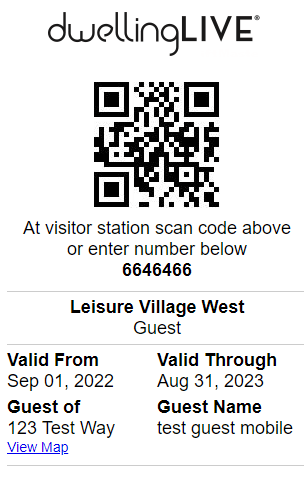
Figure 1 - Example of an ePass
Printed passes can be done on two types of paper, Thermal Direct and Thermal Transfer paper. The printed passes from the gatehouse application on a visitor station PC use a simple barcode, different than the ePasses. These passes use a default template and are 4 inches in width, 5.85 inches in length (see below).
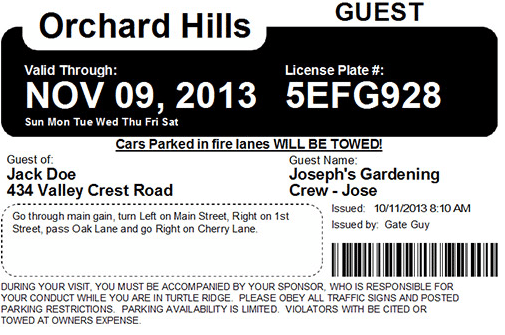 Figure 2 - Printed Pass Template (4” x 5.85” passes)
1.3 WHAT ARE THE TYPES OF GUESTS?
Guests can be Permanent or Temporary; Permanent Guests are never removed from the property guest list for a home and Temporary Guests are removed after a set maximum duration (unless the resident set less time than the maximum).
1.4 WHAT ARE THE TYPES OF PASSES?
Visitor passes can be configured in multiple ways, but the default is multiple pass “types”, each for each type of default visitor. Additional custom passes can be created (without limit) by a Dealer or a Community Administrator. Further limits can be placed on resident users in the total amount of each guest type and how long each pass lasts.
1.5 HOW DOES A VISITOR GET A PASS?
Most convenient way to get a pass is for a resident to access their account, add the visitor to their guest list with the appropriate pass type and send the pass with barcode via text, email, or both to the visitor. Passes can also be printed at the Gatehouse if there is a PC with a supported printer.
1.6 HOW LONG DO PASSES LAST?
Guest duration is different than pass duration; It doesn’t matter if the visitor is a Permanent Guest or a Temporary Guest the pass duration has a maximum after which the pass expires. For example, if a permanent guest is created, the pass type used to create that guest will have a duration set between 1 and 365 days. Even if the visitor is permanent, the pass will need to be reissued after it expires. Permanent Guests remain on the guest list after a Pass Expires.
1.7 WHAT HARDWARE IS USED FOR VISITOR MANAGEMENT?
Hardware for Visitor Management is divided into 3 categories: Visitor Stations, License Plate Reader (LPR) Hardware and Telephone Entry Units. Specific Models can be seen in the supported hardware list.