
GHA Update Email: How to Update
Update Information
Our development team is always working to improve and optimize the Gatehouse application. After a new version is released, the user (typically the guard on duty) will be prompted to update the application upon start up, with the option to ‘Skip’ the update.
It is important to note, if the user has skipped the update for at least 2 versions, an email is sent to all of the community administrators. This email will inform individuals that the Gatehouse application is not using the most recent version of the application.

To Update:
To update the Gatehouse application, users need to close the Gatehouse application and then reopen it. When the ‘Update’ prompt appears, click "OK" to run the update. The update will run in the background and when it’s complete the application will relaunch, allowing the user to log in.
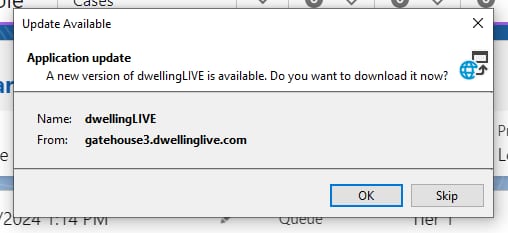
If the user chooses to ‘Skip’ the update, they will be given another opportunity to update the Gatehouse application the next time they open it.
Users may also update the Gatehouse App by going directly to https://gatehouse3.dwellinglive.com/update.htm and clicking 'Install'.