
Manager - Facility Reservations Automatic Approval (Auto-Approve) Feature
We’re updating this article. Some screenshots or names may look older than what you see in the product.
Background
The FRONTSTEPS Facility Reservations application has been enhanced to accommodate automatic approval of facility reservation requests.When a Resident submits a request to reserve a Community facility, a notification is sent to the Manager. The Manager then approves or rejects the request in the portal. Based on customer feedback, a Facility Reservation Automatic Approval (Auto-Approve) feature has been added to FRONTSTEPS. With Auto-Approve enabled on a facility, all Resident reservation requests for that facility will be automatically approved, saving time for Managers.
Important Notes:
- Residents will be limited to five upcoming auto-approved reservations per facility to ensure no one books a facility for more than a fair amount of time. Residents will still be able to request an unlimited number of reservations on facilities where Auto-Approve is not enabled.
- The Facility Auto-Approve feature and the Facility Social Distancing feature are mutually exclusive, so they cannot both be enabled at the same time.
- Auto-Approve cannot be enabled on a facility that is shared between communities
- Managers will not receive any type of notification when a reservation is automatically approved.
Setting Up Facility Automatic Approval
From the Manager Dashboard, select the Tools option using the icon.
icon.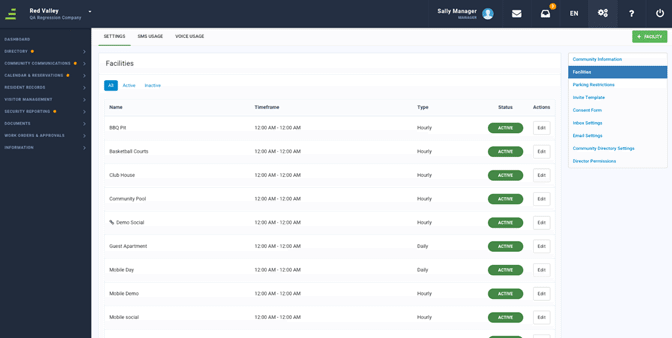
Select Facilities from the drop-down menu.
Select the Edit option next to the facility you want to modify for automatic approval of reservations.
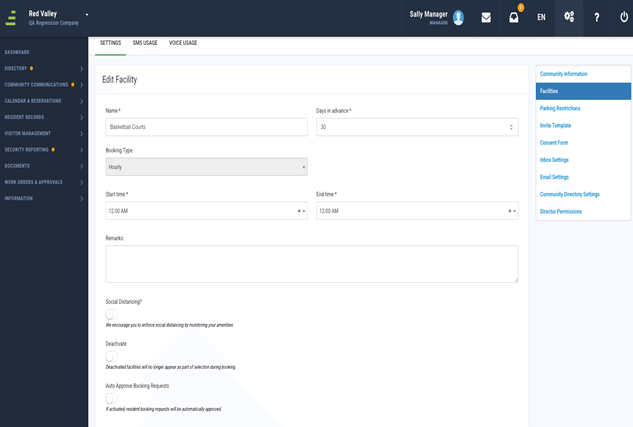
To enable automatic approval for the facility’s reservations, slide the Auto Approve Booking Requests button to the right. The button will turn green indicating Auto-Approve is enabled.
Select Update Facility.