
Deleting a Scheduled Payment for a Homeowner – FSPay 3.0
We’re updating this article. Some screenshots or names may look older than what you see in the product.
To delete one, or more, scheduled payment(s) for a homeowner, click ‘Delete’.
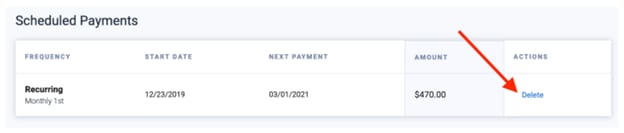
Click to ‘Yes’ when asked “Are you sure you want to delete the scheduled payment?” to proceed in deleting the scheduled payment. Otherwise, click ‘No’ to cancel and return to the screen.
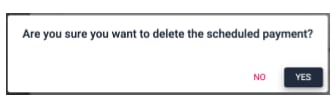
Click to ‘Yes’ when asked “Are you sure you want to delete the scheduled payment?” to proceed in deleting the scheduled payment. Otherwise, click ‘No’ to cancel and return to the screen.