
Credentialed Access- Hardware Introduction
INTRODUCTION
There are two major systems in FRONTSTEPS Dwelling that interact directly with supported hardware: Credentialed Access and Visitor Management. The Credentialed Access module revolves around the concept of an access device, and the supported hardware will fill specific roles from adding an access device, managing device permissions and more. This document is for the preparation and execution of projects using the Credentialed Access product module and related hardware. Before discussing the hardware and other data processed in Credentialed Access, it’s important to understand core concepts to the FRONTSTEPS Dwelling Product.
1.1 WHAT IS AN ACCESS DEVICE?
An access device is a device used to identify the holder and allow door behavior based on that identification. In FRONTSTEPS Dwelling, an access device is a number in a valid device format. Ingress and egress are permitted and controlled based on rules tied to each number. Access devices can be devices that transmit their ID over radio (RFID), a keypad sequence or other input that is transformed into a supported format.
1.2 WHAT IS AN ACCESS DEVICE ID?
An access device ID depends on the device format being used. FRONTSTEPS Dwelling supports standard 26-bit Weigand and 37-bit Weigand devices. These numbers break down into two pieces: the facility code and the access device number. Access device IDs must be unique; the full number (facility code + device number) must be unique in the community database.
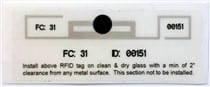
Figure 1 - Windshield Tag with the Facility Code (FC) and Device Number written on it: the Facility Code is 31, Device number is 00151 (which is a 26-bit Access Device ID)
1.3 WHAT IS A FACILITY CODE?
The facility code is a number that is set as the same number for a batch of devices. The formats supported by FRONTSTEPS Dwelling have facility codes in them. The facility code is set by the community when an order for devices is made. For example, when ordering a batch of 50 devices (like key fobs) all fifty devices will start with the same facility code. Facility codes can be used to differentiate devices, an example is using facility code 10 only for key fobs. Facility codes can also be used to differentiate users, using a specific code to give devices to staff members is another example.
1.4 WHAT IS A DEVICE NUMBER?
The device number is the second half of the Access device ID. The number must meet the requirements of one of the supported formats and must be unique. These numbers are set in a range by the community when an order for devices is made. For example, the community could use facility code 16 for every 26-bit device they order, and the device numbers could start at 00001 and end at 00049. The means each device will start with 16 and have one of the device numbers in the specified range.
1.5 WHAT IS AN ACCESS DEVICE CREDIT?
To add any access device ID to FRONTSTEPS dwelling a one-time credit is needed. When a device is added to FRONTSTEPS Dwelling manually or via bulk import a credit is used for each device and can’t be returned even when a device is deleted. When devices are ordered from FRONTSTEPS, credits that match the number of ordered devices are added to the community at no cost. If the community runs out of access device credits, more will need to be purchased to add new devices.
1.6 WHAT IS AN ACCESS LEVEL?
An Access Level is a profile given to an access device that dictates which doors can be accessed on which days during which times: It is a ‘Schedule’ applied to a ‘Door Group’.
1.7 WHAT IS A DOOR GROUP?
A door group is a set of readers that control specific doors or gates. Door groups are set up to create different access levels.
1.8 WHAT IS A SCHEDULE?
A schedule is a set of the times on each day of the week that an assigned Door Group will allow access to an access device on that schedule.
1.9 WHAT IS A READER?
A reader is any Weigand input device the serves as an input to our supported gate controllers.
1.8 WHAT IS A CONTROLLER?
Controllers are network devices connected to FRONTSTEPS Dwelling via Ethernet. They receive input from a reader and make the decision to open the door. All controllers compatible with FRONTSTEPS dwelling must connect to the web portal. They not only make the decision to open the door/gate (based on access device validity, access level, schedule, and location) but they also report data on access to the web portal so users can monitor those decisions.
1.9 WHAT IS AN “INTERFACE”?
Interfaces (also known as sub-controllers) are middlemen, allowing door hardware connected to them (i.e., door controllers upstream along the signal path or readers/relays downstream along the signal path) to function. They are used in situations where more than two doors are connected to a single main controller within a limited space (within 4,000 feet is the rule). Distances greater than 4,000 feet would require multiple main controllers. Sub-controllers usually do not make access decisions, and instead forward all requests from readers to the main controllers.