
Site Admin - Creating a Group Page
The Group Page module allows Communities to have Group/Club/Committee specific web pages within your website.
To create a Group Page:
To create a Group Page:
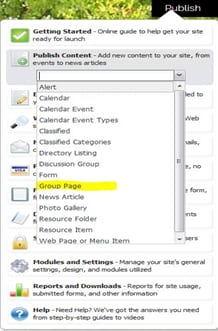
- Navigate to Publish
- Click Publish Content. Select Group Page.
- Select Group Page from the drop-down list.
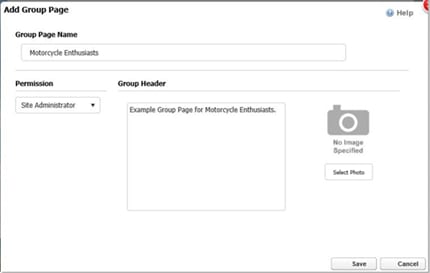
- Group Page Name: Type the name of the group
- Permission: Grants permission for the Group Page/enables page access
Example: If the permission is set to Manager, then only Manager and Site Administrator Security Roles will see the Group Page on the Group Page List.
- Group Header: This plain text only box displays summary information about the group on the Group Page List (for those set with permissions)
- Select Photo: Allows the upload of a photo and displays on the Group Page List
- Click Save