
Admin/Manager - Creating a Facility
We’re updating this article. Some screenshots or names may look older than what you see in the product.
This feature is for setting up facilities at your community, that are available to residents to reserve and/or rent.
From the Manager Dashboard, select the Settings icon , then select Facilities.
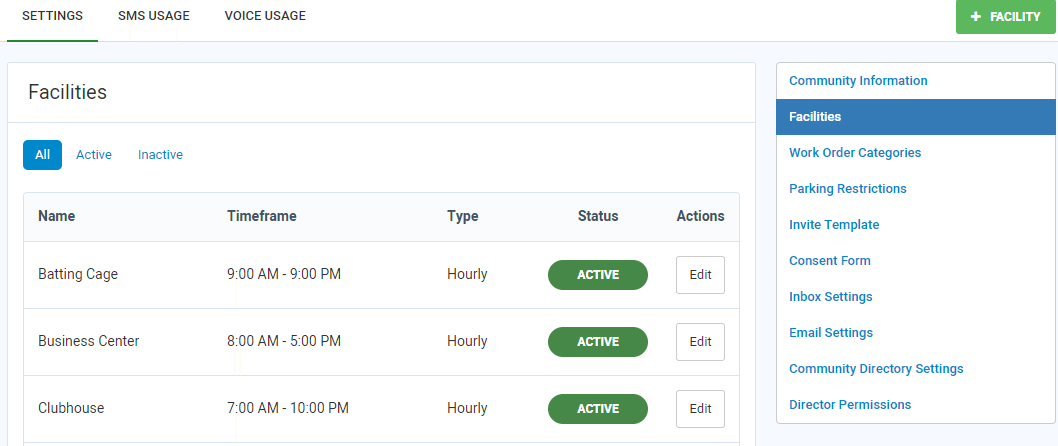
1. To add a facility, select the + FACILITY option.
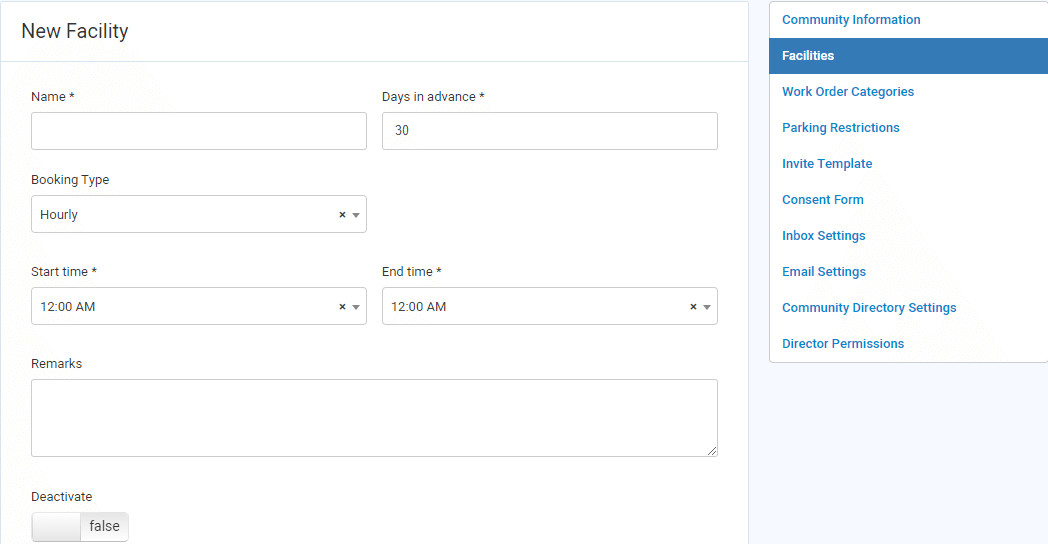 2. Add the facility Name.
3. Add the number of Days in advance the facility is available for booking.
4. Select a Booking Type of Hourly or Daily.
5. For a Booking Type of Hourly, select the Start Time and End Time that the facility is available for booking each day.
6. Add any relevant Remarks.
7. Set the Deactivate option to false to enable a facility to be booked. Setting the option to true removes the facility from the list of available booking venues.
8. Select Create Facility. The facility is now available for booking.
From the Manager Dashboard, select the Settings icon
, then select Facilities. 1. To add a facility, select the + FACILITY option.
2. Add the facility Name.3. Add the number of Days in advance the facility is available for booking.
4. Select a Booking Type of Hourly or Daily.
5. For a Booking Type of Hourly, select the Start Time and End Time that the facility is available for booking each day.
6. Add any relevant Remarks.
7. Set the Deactivate option to false to enable a facility to be booked. Setting the option to true removes the facility from the list of available booking venues.
8. Select Create Facility. The facility is now available for booking.