
Community Admin-dwellingLIVE- Restrict Guests
We’re updating this article. Some screenshots or names may look older than what you see in the product.
Background
The Visitor Management module now integrates with the FRONTSTEPS Community module.Notes
- The feature is available to all users as follows:
- Community Admins with dwellingLIVE
- Availability - This enhancement will be activated and available to all customers who purchase the Visitor Management Product integration.
Features
- Community Admins can restrict guests, on behalf of homeowners.
Like homeowners, Community Admins may also restrict Guests.
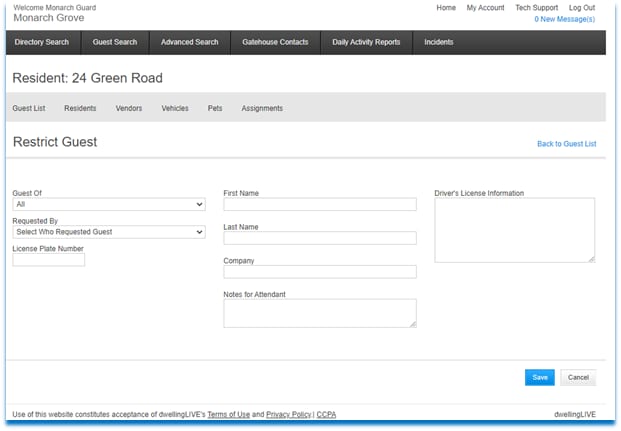
To Restrict a Guest:
- Select the Administration tab>Community Directory.
- Select the Unit.
- Select Guest List.
- Select the Restrict Guest link from the Guest List page.
- From the Guest Of dropdown select either All (for all of the community) or the homeowner for which you are restricting the Guest.
- From the Requested By dropdown, select who requested the restriction.
- Enter the License Plate Number (required).
- Enter the First and Last Name of the Restricted Guest.
- Enter the Company associated with the Restricted Guest, if applicable.
- Enter any Notes for Attendant.
- Enter any Driver’s License Information.
- Select Save.