
Board Members - Board Documents in the Community Web Portal
Background
Based on customer feedback, FRONTSTEPS has integrated board member documents between the FRONTSTEPS Community portal and the FRONTSTEPS Caliber Desktop. This seamless user experience will allow Directors in the Community portal to view documents residing in FRONTSTEPS Caliber that have been designated within Caliber as board specific documents.
Availability - This enhancement will be available to all customers with Caliber Desktop integration.
Activation – Your Solutions Delivery team member will need to enable this feature. If your community currently utilizes the Accounting Document feature inside Internal Documents, the new board member document section will be automatically available to you.
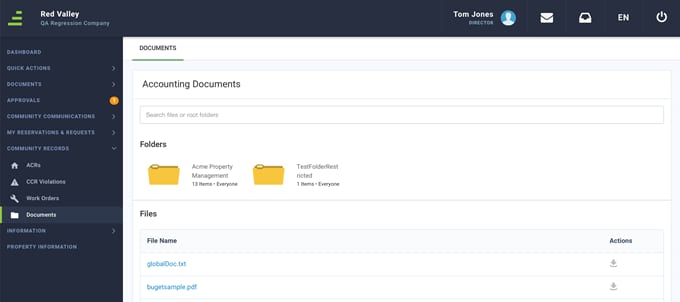
Directors and Managers will go to the Community Records section and click the Documents feature to see board specific documents.
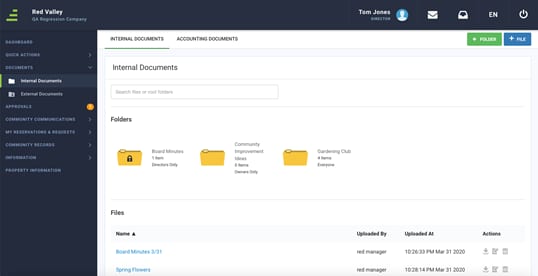
To continue to access these documents, a board member would go to the Documents Tab > Internal Documents.
Based on customer feedback, FRONTSTEPS has integrated board member documents between the FRONTSTEPS Community portal and the FRONTSTEPS Caliber Desktop. This seamless user experience will allow Directors in the Community portal to view documents residing in FRONTSTEPS Caliber that have been designated within Caliber as board specific documents.
Accessibility
The feature is available to all users as follows:- Managers
- Directors
Availability - This enhancement will be available to all customers with Caliber Desktop integration.
Activation – Your Solutions Delivery team member will need to enable this feature. If your community currently utilizes the Accounting Document feature inside Internal Documents, the new board member document section will be automatically available to you.
Features
This enhancement provides the following features:- Integration – Data will pull from Caliber Desktop via AIS into the FRONTSTEPS Community Portal, eliminating the need for managers to upload documents to both platforms.
Access Board Documents
Board Member Experience
Managers can mark documents inside Caliber as viewable to the board only if they want board members to see the document(s) in the Community portal. These documents can include things like board meeting minutes, upcoming news, and privileged information.Directors and Managers will go to the Community Records section and click the Documents feature to see board specific documents.
Resident Experience
Board members can still view documents marked for residents as well.To continue to access these documents, a board member would go to the Documents Tab > Internal Documents.