
Dealer - Adding New Credentials to dwellingLIVE Community
We’re updating this article. Some screenshots or names may look older than what you see in the product.
Bulk Activation of Access Devices
-
Log in as a dealer
-
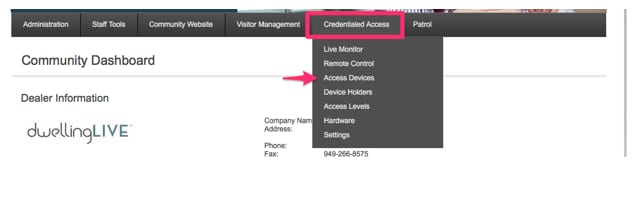
From the Main Menu choose Credentials Access > Access Devices
-
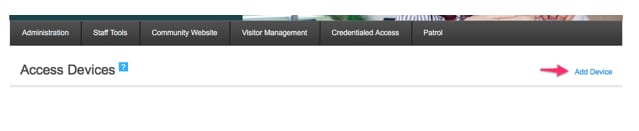
On the Access Device page, on the top left of the page click on ‘Add Device’
-
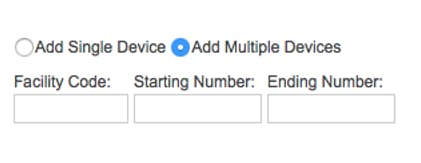
Choose the Add Multiple option
-
Enter the Facility Code, Starting Number and Ending Number of the Credential block.
-
Choose a device type, Active On date
-
Set ‘Assign From”: Unassigned
-
Choose Access level
-
Click Save
This may take a few moments to complete. Once completed, you will see all of the devices in the number block listed on the Access Device page as Unassigned.