
Resident - Adding a News Article
News Articles are a great way to provide news, announcements and other related Group information on the Group Page. News Articles allow Site Administrators and Group Leaders to add text, link to information, and insert media and documents by using the full website editor for any desired content. Any added News Articles are listed in the News section of the Group Page by title and will display in a popup window when selected. Additionally, access to individual News Articles can be restricted and a range of dates can be defined for the displaying the article on the Group Page.
1. While viewing a Group Page, Click on the Add News Article button
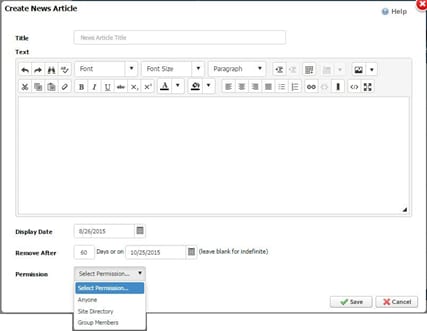
2. The Create News Article window opens and contains the following components:
1. While viewing a Group Page, Click on the Add News Article button
2. The Create News Article window opens and contains the following components:
- Title: Title of the News Article (required)
- Text: Content area where text, media and documents, etc. are entered
- Display Date: Sets the display start date for when the article will show on the Group Page
- Remove After: Removes the article after a certain amount of days or on a specified date
- Permission:
- Anyone: Anyone can see the Group Page News Article
- Site Directory: Only those contained within the website Directory can see the Group Page News Article
- Group Members: Only a Group Member can see the Group Page News Article