
Site Admin - Adding a Group Page List to the Menu
The Group Page module allows Communities to have Group/Club/Committee specific web pages within your website.
To add a Group Page List to the menu:
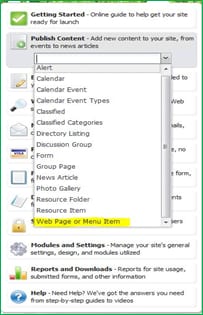
Select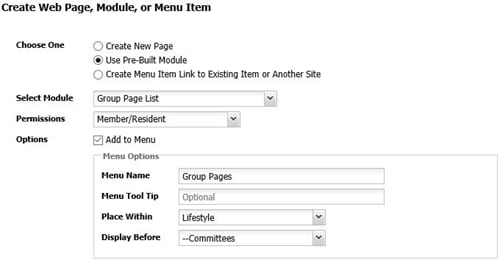
To add a Group Page List to the menu:
Select
- Publish
- Publish Content
- Web Page or Menu Item (from the drop-down) Admin
- Use Pre-Built Module
- Group Page List (from the Select Module drop-down)
- In the Permissions drop-down, choose who will be able to see the Group Pages menu
- Check the Add to Menu box
- Menu Name: Give the menu item a name
- Menu Tool Tip: Optional
- Place Within: Places item on the main menu or within an existing menu as a sub-menu
- Display Before: Places the menu item before the item you select
- Click Save