
Admin/Dealer - Activating the Voicemail Scheduling
We’re updating this article. Some screenshots or names may look older than what you see in the product.
-
Log into your dwellingLIVE community as a Community Administrator or Dealer credentials
-
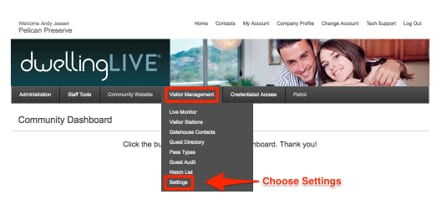
Select the Visitor Management Tab and choose Settings
-
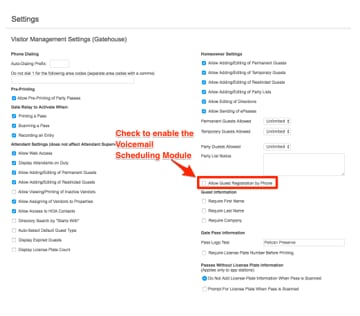
Scroll down and on the right-hand side of the page, check Allow Guest Registration by Phone
-
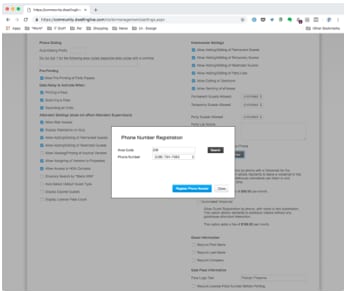
Owners and residents can use (888) 994-4117. If you would like a personalized number click Request New Phone Number
a. Enter your Area Code and click Search, choose one of the available numbers
-
Choose the voicemail service:
-
Voicemail: Allow Guest Registration by phone with a Voicemail for the gatehouse. This option allows residents to leave a voicemail in the system, which your gatehouse attendants can listen to and process in their downtime. Billed monthly at $99 per month.
-
Advanced Voicemail: Allow Guest Registration by phone, with voice-to-text automation. This option allows residents to schedule visitors without any gatehouse attendant interaction. Billed monthly at $199 per month.
-
-
On the bottom, right-hand side of the page choose Save to save your settings
Testing the Voicemail Scheduling module:
-
Using from a phone number that is already listed in dwellingLIVE, dial the toll-free phone number or local phone number.
-
The system will recognize the caller using the caller-ID. If the number is linked to one or more dwellingLIVE account, the system will list the properties associated with the number and will allow the caller to choose the property.
-
Follow the prompts for scheduling your guest and click # to save.
-
The message will now be available to the security personnel to review and schedule the guest.