
Admin/Dealer - Setting up a Web Station
We’re updating this article. Some screenshots or names may look older than what you see in the product.
You will need community administrator credentials in order to add a web station to your community.
1. Go to community.dwellinglive.com and login as an administrator > click the "Visitor Management" tab on the top navigation bar > click "Settings" from the drop down menu > check the box next to "Enable Web Access" > click "Save".
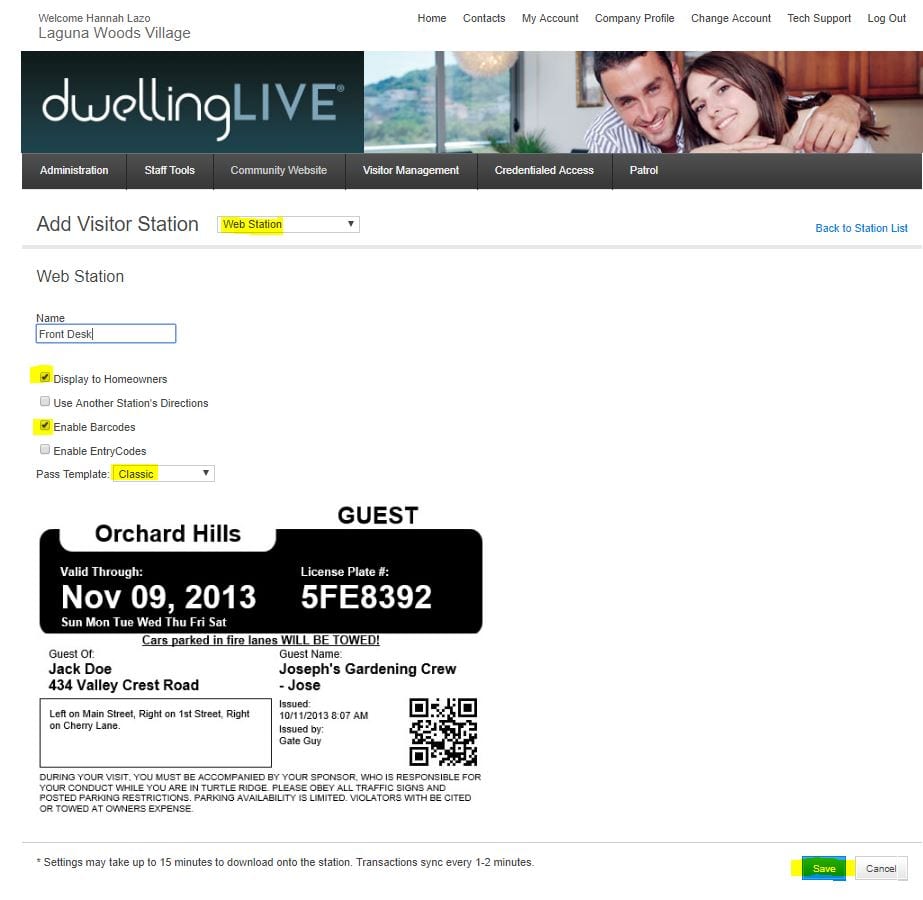
2. Click the "Visitor Management" tab again > click "Visitor Stations" > click "Add Station" in the top right corner > select "Web Station" from the drop down menu > enter a name for the station (Ex: Front Desk) > see image below for reference > click "Save"
3. Repeat as needed.