
Site Admin - Voting Booth
This document explains the Voting Booth tool from AssociationVoice and how it can be used.
Voting Booth description
The Voting Booth tool allows a user to add a voting option or a survey to their site. This is a useful tool when needing to gather feedback on certain issues or requesting opinions. The voting booth option is easy to use and is customizable to the user’s need. This option includes the following features:
- Ballot / Survey Builder
- Easy access to create and view voting booth forms.
- Display a list of voting booth forms with status of open/closed/voted.
- Display the number of participants that have voted.
- If the voting booth form is restricted to Home or Contacts, it also shows how many have not voted.
- Settings and Options
- Basic and advanced Form Fields
- Single Line Text – text box to set instructions for survey. For a question that is open ended this will allow a sentence or two for a response.
- Paragraph Text – text box for additional information. For a question that may require a lengthy answer or additional comments this allows for several sentences.
- Date – date for scheduling the opening and closing of voting booth.
- Number – allows for a numeric range.
- Checkbox – allows for a choice between two options.
- Checkboxes – allows choice of more than one option (check all that applies).
- Multiple Choice – allows one choice from multiple options.
- Dropdown – allows one choice from a dropdown menu.
- Instructions – text box for survey instructions and also can be used for image upload and then add a check box to select which picture is best etc.
- Likert (scale) – allows for scaling responses.
- Rating – allows for setting a rating scale using star options. Up to 10 star rating.
- Basic and advanced Form Fields
- Additional Features
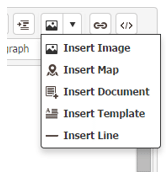
- HTML Editor with image load allows:
- Image insert
- Map insert
- Document insert
- Template insert
- Line insert
- Field Settings to control alignment.
- Opt-In required setting.
- Built-in Intelligence to restrict voting per home or per person.
- Permissions setting to make voting booth public or private.
- Customizable Submittal Text.
- Display Results to participants option.
- Open and Expiration Date Settings – ability to set dates to open and close a survey.
- File Upload – ability to upload files into the survey form.
- Smart Fields – These can be found when in single line text for full name, association name, phone number, email, etc.
- Image insert
- HTML Editor with image load allows:
- Results and Reports
- Downloadable report for easy data collection in a spreadsheet.users
- Mail label print option for hybrid election.
- View as pie chart, bar graph and text results.
- Permission controls for results
- Site admins have options to control based on a permission level who can see or not see results.
- Downloadable report for easy data collection in a spreadsheet.users
To Begin Creating a voting Booth:
To watch and learn Click Here
Sign into site
- Users can access voting booth via module on website OR
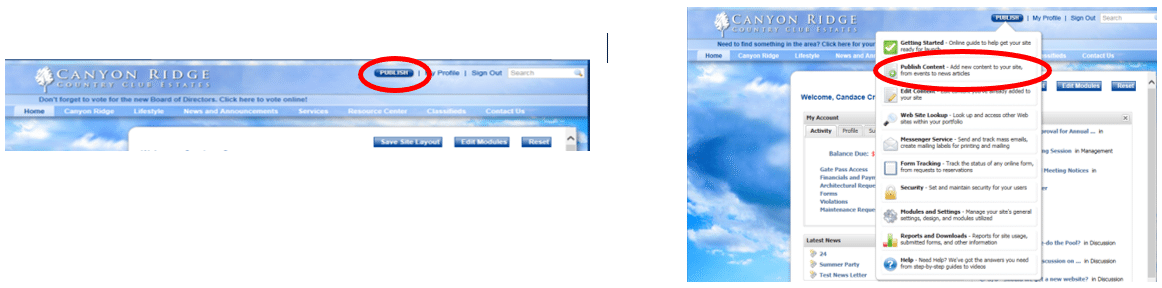
- If Voting Booth does not have a “Tab” or menu item already, then Click on Publish, then click Publish Content, then choose Voting Booth.
Add the Voting Booth Module
To add a Web Page:
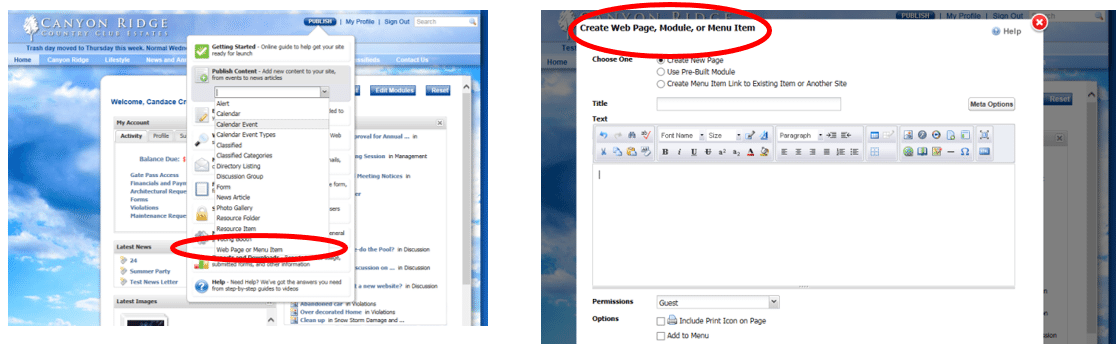
- Click the Publish menu, click Publish Content, then from the drop down click Web Page or Menu Item. The Create New Page, Module, or Menu Item Editor will be displayed.
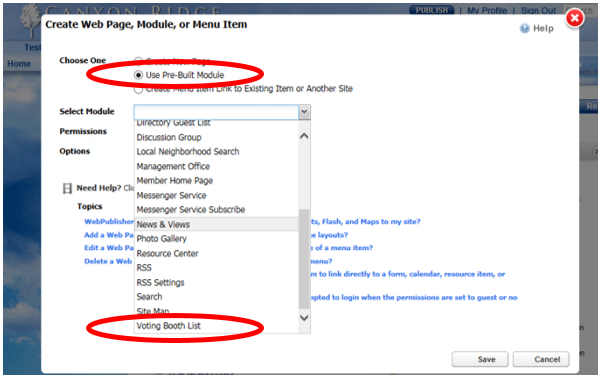
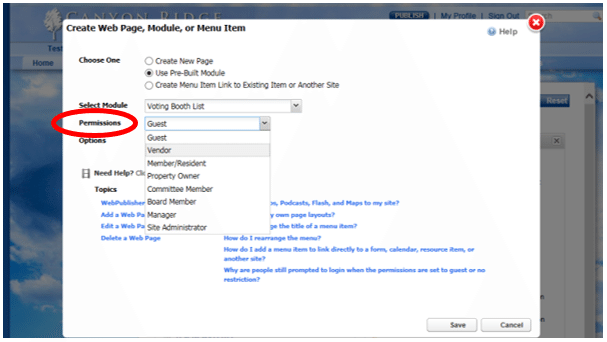
- Choose the Use Pre-Built Module. From the drop down menu click on Voting Booth List.
- In the Permissions drop down menu, select the desired security level. The Permission level is based on an ascending hierarchy. The Guest permission level allows all non-registered users and above to access certain items on the site, while the Manager permission level only allows association managers and above to access certain items. Helpful hint: The guest would be the preferred way so that residents that aren’t logged in can still see the module but not necessarily the booth itself because at the individual booth level you can set role based permissions
- If you would like to add Voting Booth to your Web site's menu, select Add to Menu, then enter a Menu Name, Menu Tool Tip, and where you would like the page to be displayed within the menu.
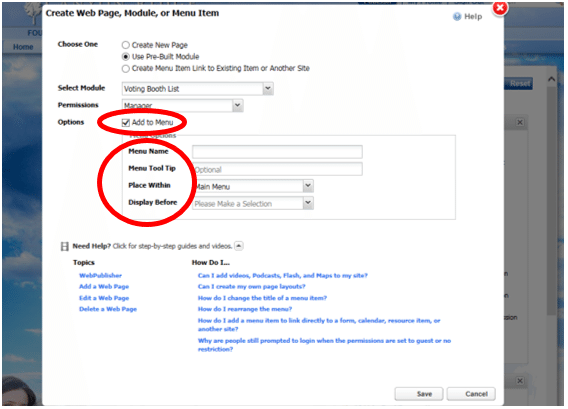
- The value entered in the Menu Name field will be displayed in the menu. We recommend using brief names.
- The Menu Tool Tip is used to hold descriptive text about the menu item. The descriptive text displays when a user hovers their mouse over the menu option. It typically includes a brief description for the user, e.g., "To get the latest scoop about what’s happening in our association, click here."
- The "Place Within" and "Display Before" drop down menus are used to indicate where you would like the menu item placed within the main menu. Both drop down menus contain a sequential listing of all menu items. Simply select the appropriate value from each menu. If you would like the Web page to be displayed at the end of the main menu, choose the "<At Main Menu End >" option.
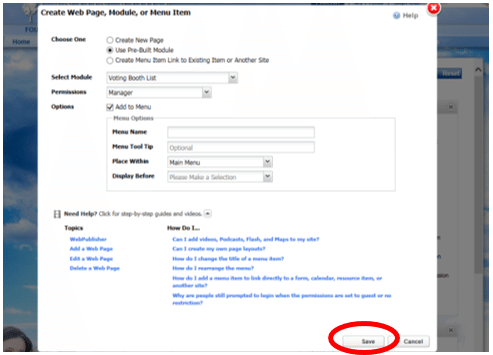
- Click Save. Upon saving, you will see the page you just added. Be sure to review your entry.
Once in the Add Voting Booth screen:
- Highlight Untitled Voting Booth and type in new name (i.e. Board Elections).
- You can update the description field by clicking on the text, opening a text field. Type in the description desired.
Start Creating
- Click on the + sign at the top right of your screen.
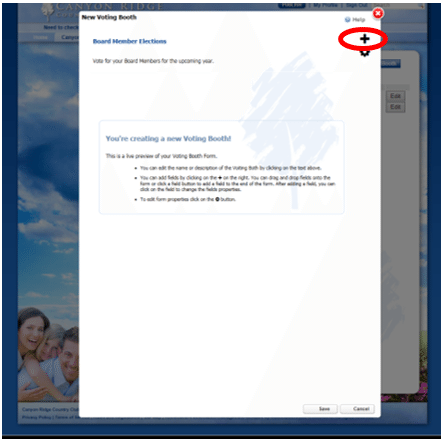 Click or drag and drop a Field (checkboxes, multiple choice, etc.) on to the form.
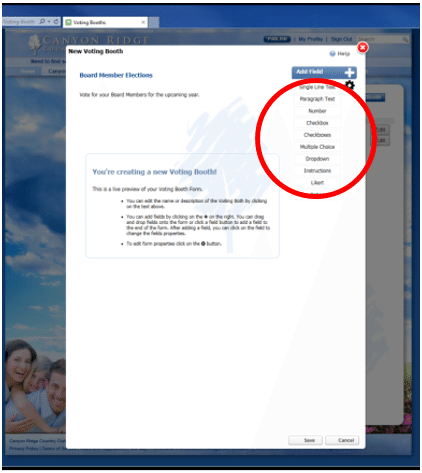
- Customize questions and options by clicking on the Field Selection Title.
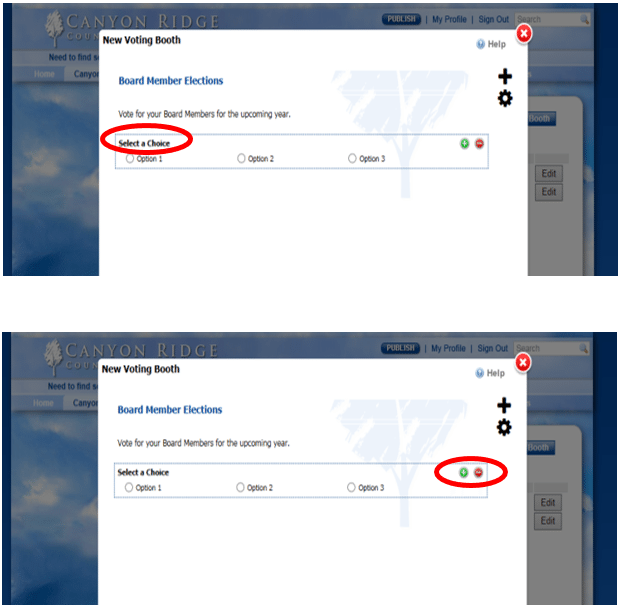
- The Green Plus sign in this field will add a second line.
- The Red Minus sign in this field will delete the line.
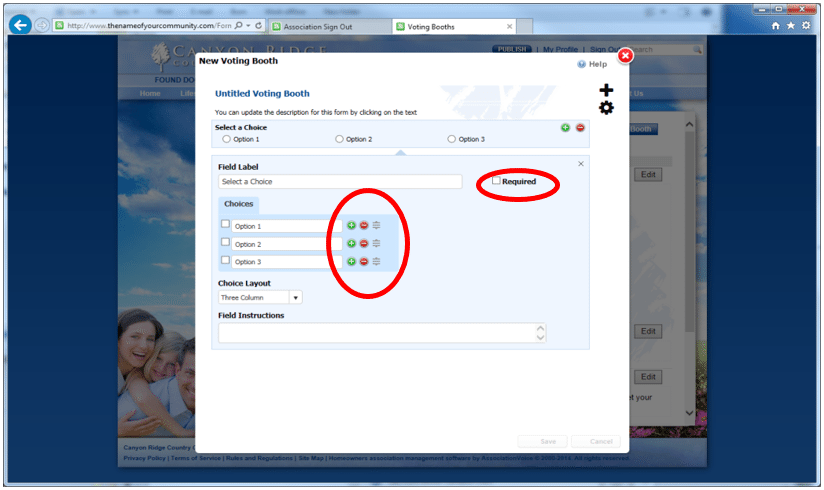
- The Green Plus sign will add a line below.
- The Red Negative sign will delete a line below.
- The Grey Symbols are a drag and drop feature that will reorder the options.
- By clicking the Required Field, the question must be answered before the participant can save their survey results.
- The same steps apply to all customizable fields.
- You do not need to hit Save at this time, just click out of the editing area.
- To open the field again, click on the Field Selection Title.
- Once all questions are added and looks how you would like, click out of the editing area for the Save button to appear. Click Save before moving on to the Settings tab.
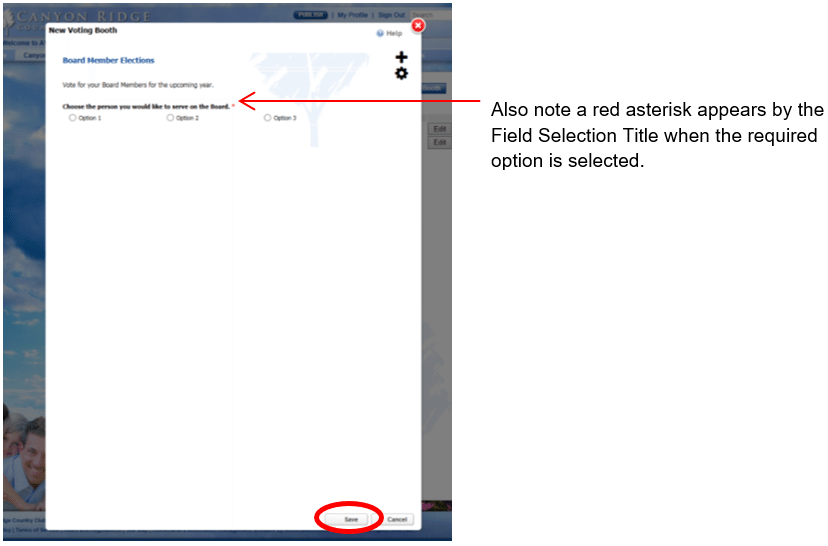
- Once the Voting Booth is saved, the Voting Booth main page will show. Click on Edit, to open the particular Voting Booth to be edited.
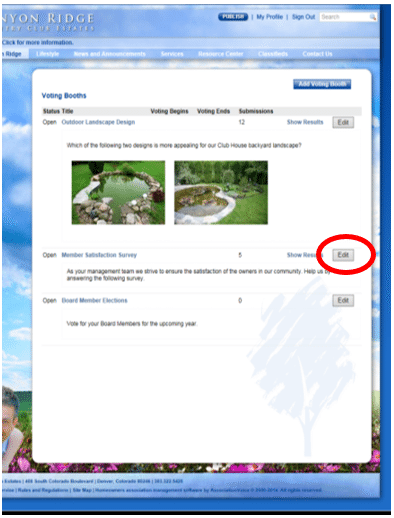
Voting booth Settings
To open the Settings screen, click on the gear icon.
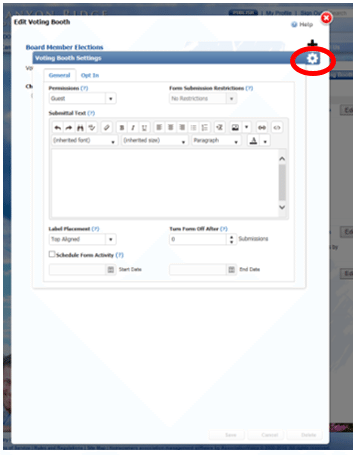
- In the Settings screen, under the General tab, use the Permissions property to restrict who can view and submit this form.
- Form Submission Restrictions - If Member/Resident or Property Owner is selected under Permissions, this field can be used to restrict the number of submissions by Owner or Property.
- Submittal Text – Use this property to display a message to the form submitter after a form submission.
- Label Placement – This property sets the field labels to be placed above the fields or right/left aligned on the left side of the fields.
- Turn Form Off After Quorum Is Met – This property will set the total number of entries the form will accept. Once the form has accepted that number of entries, the form will stop accepting submissions. Leave this blank for the form to collect unlimited entries.
- Schedule Form Activity – Use this property to automatically set open and close dates.
Opt In
- This property will allow users to Opt In before viewing and submitting the form. Click on the Opt In tab to open this option.
- Click the Require Opt In box to enable this property.
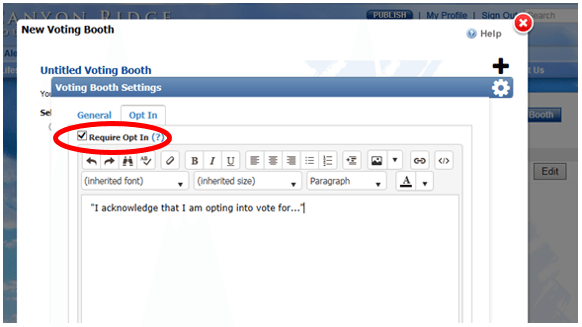
- Use the text field to send a message to participants after the form is submitted.
- To leave this page, click anywhere outside the Settings screen.
- Click Save.
Add Voting booth
- In the drop down menu, click on Voting Booth.
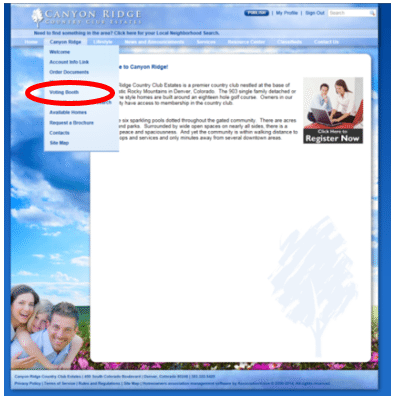
- Click on Add Voting Booth to create additional Voting Booths
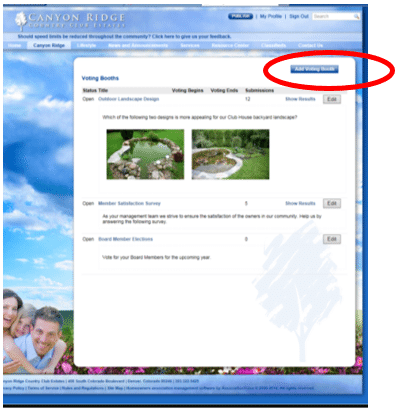
- Repeat steps to create additional Voting Booths.
FAQ’s
Q. Can each Voting Booth be limited on a user profile?
Yes, in the Voting Booth settings.
Q. Can you add a link to a resource document?
A. Yes, you can add a link to a resource document.
Q. Can you multi-select photos?
A. You can upload multiple images but only insert one at a time.
Q. Is the Voting Booth tracked in a web form submission?
A. No, it is not displayed in form tracking.
Q. Can everyone see the results?
A. Viewing results is a permissions based selection.
Q. Can you make fields required?
A. Yes. Use the Required Field checkboxes.
Q. Can you restrict who can view the Voting Booth module based on rules?
A. Yes, wither by the Voting Booth or the module all together.
Q. Can the enterprise edition push to all of the client’s communities?
A. No, not at this time.
Q. How do I get images to show on my ballot / survey?
A. You will need to upload the images into the ballot / survey description field.
Q. Can I run a weighted election based on HOA dues?
A. No, we do not have the ability to weight individual votes for a weighted election.
Q. Can I use Voting Booth for electronic elections in California and Florida?
A. We advise that you check out your state and local laws along with your communities.