
1099 IRS IRIS Export Format

Official User’s Guide
Caliber Desktop | October 2024
1099 IRS IRIS Export Format
© 2023 FRONTSTEPS Caliber - 1290 Broadway, Suite 1250, Denver, CO 80203
(800) 992-4384 | [email protected] | frontsteps.com
This is a copyrighted and confidential document intended for users of properly licensed FRONTSTEPS Caliber. Any other use or reproduction of this document in either hard copy or digital form is prohibited unless authorized, in writing, by FRONTSTEPS Caliber.
 1099 IRS IRIS Export Format
Introduction
Important Updates for 1099 Filing in 2024
The IRS recently lowered the threshold for electronic filing of returns, which means filers with 10 or more 1099 forms in a calendar year must now file electronically. This change applies whether the forms are for your own organization or others.
The IRS now offers the IRIS Taxpayer Portal, allowing you to:
- E-file up to 100 returns at a time
- Enter returns manually or upload them via .csv file
Getting Started with IRIS: You’ll need an IRIS Transmitter Control Code (TCC) to use this portal. This 5-digit code uniquely identifies your business for e-filing.
Apply for your TCC here: IRS TCC Application.
Keep in mind that it may take up to 45 days for your TCC to be issued, so we recommend applying early.
For more details on using the IRIS Portal, please refer to the IRIS Taxpayer Portal User Guide, Publication 5717
Export Option for IRIS in Caliber
To support self-filers, Caliber has added a new feature to the ‘Export to CSV File(s)’ button within the 1099 process. When you select this option, you can export your 1099 data in the correct format for the IRIS Taxpayer Portal. This export will generate separate files for the 1099-MISC and 1099-NEC forms, which you’ll then upload to the IRIS Portal.
To generate, go to AP -> 1099 Output -> Output 1099s.
- Select the client(s) to generate the 1099s for
- Select the 1099 start and end dates (usually the first and end of the year)
- Once complete, select the option “Export to CSV File(s)”
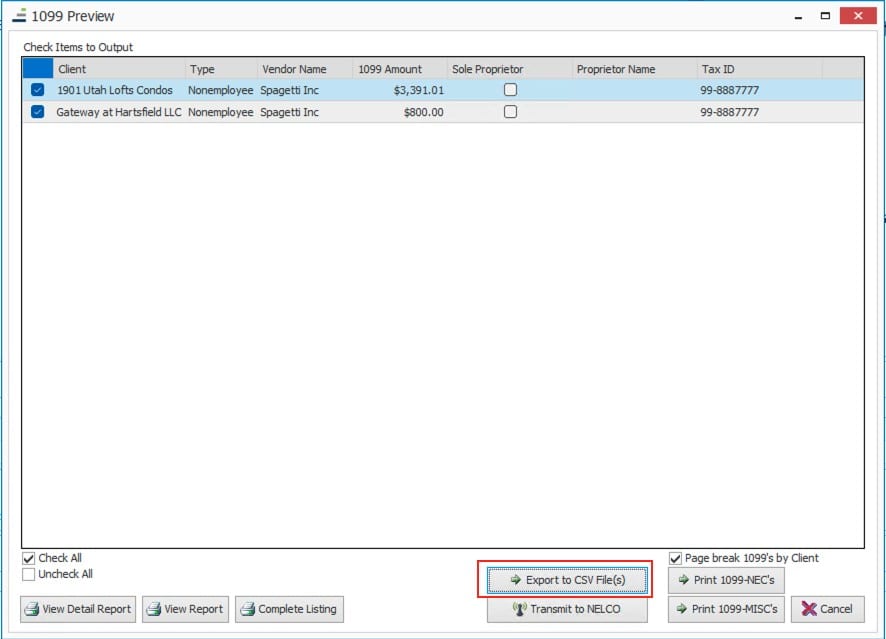
- In the next dialog, select “Use the IRS E-file IRIS Taxpayer Portal Format”
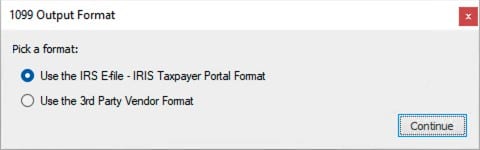
- Select a directory for the output.
- Once complete, Caliber will output one or more files, depending on the volume of 1099s that need to be created, and the type of 1099.
- The IRIS portal requires that 1099-NEC and 1099-Misc forms be filed separately. Caliber will automatically produce separate files for each form.
- The IRIS portal will limit files to 100 entries each. Caliber will automatically produce files with no more than 100 entries.
- The export files will have the naming convention of:
IRIS_1099_NEC_YYMMDD_1.csv or IRIS_1099_MISC_YYMMDD_1.csv
The final digit will increment by 1 for each file that is produced.
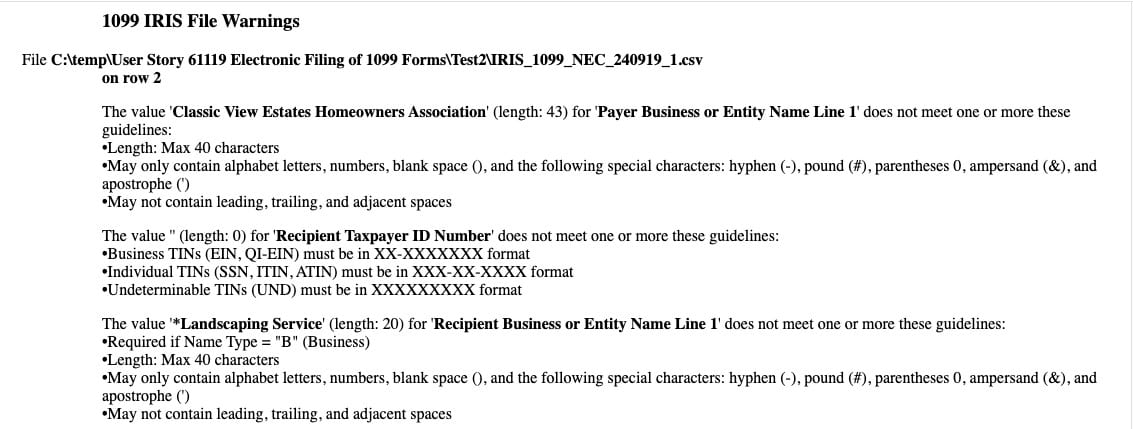
- If there are any entries that will have potential validation issues, Caliber will create an error file that will list out any entries that might need attention prior to uploading to the IRIS Portal.
- This file can be found in the same export directory as the CSV and will have the naming convention of:
IRIS_1099warnings_YYMMDD.htm
-
- The file will specify the file and where in the file the potential validation issue is.
- Users can then elect to fix the entries in Caliber and rerun the file or fix the file itself prior to uploading.
1. Note, Caliber is providing guidance to alert customers of potential issues prior to uploading to the IRIS Portal